

Wireless smartphone charging system
A wireless smartphone charging system is located in front of the center console.
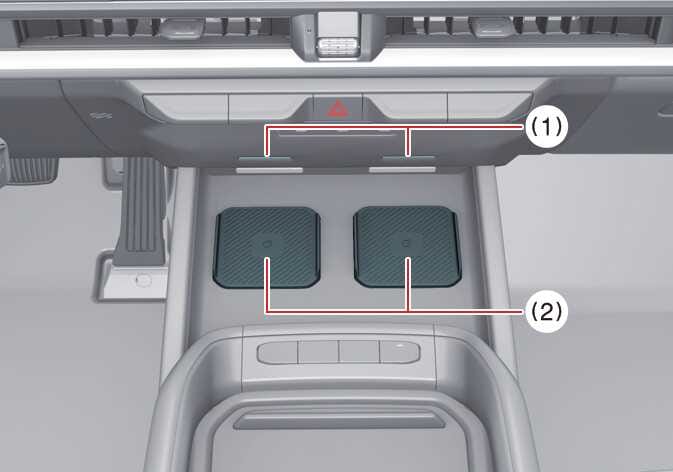 OLQ2A085041 |
|
Firmly close all doors, and start the vehicle. To start wireless charging, place the smartphone equipped with wireless charging function on the wireless charging pad.
With two wireless smartphone charging pads, you can charge two phones at the same time.
For best wireless charging results, place the smartphone on the center of the charging pad.
The wireless charging system is designed for only two smartphones equipped with Qi ®. Please refer to the smartphone accessory cover or the smartphone manufacturer’s website to check whether your smartphone supports the Qi ® charging.
If any metallic object, such as a coin, is located between the wireless charging system and the smartphone, it may disrupt charging. The metallic object may heat up.
Wireless smartphone charging
-
Remove any object on the smartphone charging pad, including the smart key. If there is any foreign object on the pad other than a smartphone, the wireless charging function may not operate properly.
-
Place the smartphone on the center of the wireless charging pad.
-
The indicator light will change to amber when the wireless charging begins. After the charging is complete, the orange light will change to green.
-
You can choose to turn the wireless charging function to either on or off on the infotainment system. (Please refer to Instrument cluster for details).
If the wireless charging function does not work, gently move your smartphone around on the pad until the charging indicator light turns amber. Depending on the smartphone, the charging indicator light may not turn green, even after charging is complete.
If wireless charging is not functioning properly, the orange light will blink and flash for 10 seconds and then turn off. Remove the smartphone from the pad and place it on the pad again, or double check the charging status.
If you leave the smartphone on the charging pad when the vehicle is in OFF position and the front door is opened, the vehicle alerts you through warning messages and sound (applicable for vehicles with voice guidance function) on the instrument cluster.
For some manufacturers’ smartphones, the system may not warn you when the smartphone is left on the wireless charging pad. This is due to the characteristics of the smartphone and is not a wireless charging system malfunction.
Distracted driving
Driving while distracted can result in a loss of vehicle control that may lead to an accident, severe bodily injury, or death. The driver’s primary responsibility is the safe and legal operation of a vehicle. Any use of handheld devices, other equipment, or vehicle systems that take the driver’s eyes, attention, and focus away from the safe operation of a vehicle are not permissible by law. These should never be used while operating the vehicle.
Liquid in wireless charging system
To prevent damage, be sure not to spill liquid over the wireless smartphone charging system.
Metal in wireless charging system
If any metallic object, such as a coin, is located between the wireless charging system and the smartphone, charging may be disrupted. The metallic object may heat up and potentially damage the charging system. If there is any metallic object between the smartphone and the charging pad, immediately remove the smartphone. Remove the metallic object after it has cooled.
-
When the interior temperature of the wireless charging system rises above a set temperature, the wireless charging will cease to function. After the interior temperature drops below the threshold, the wireless charging function will resume.
-
Wireless charging may not function properly when there is a heavy accessory cover on the smartphone.
-
To prevent radio wave disruption, wireless charging will stop when you use the wireless smart key search function.
-
Wireless charging will stop when you move the smart key out of the vehicle in ON position.
-
Wireless charging will stop when you open any of the doors (if equipped with smart keys).
-
Wireless charging will stop when you turn the vehicle off.
-
Wireless charging will stop when the smartphone is not in complete contact with the wireless charging pad.
-
Items equipped with magnetic components, such as a credit card or transportation ticket, may be damaged during wireless charging.
-
For best results, place the smartphone on the center of the charging pad. The smartphone may not charge when placed near the rim of the charging pad. When the smartphone is charging, it may heat up excessively.
-
For smartphones without a built-in wireless charging system, you must use an appropriate accessory.
-
Certain smartphones may display messages on weak current. This is due to the characteristics of that smartphone and is not a wireless charging system malfunction.
-
The indicator light of some manufacturers’ smartphones may still be orange after the smartphone is fully charged. This is due to the characteristics of the smartphone and not is a wireless charging system malfunction.
-
When you place any smartphone without a wireless charging function or a metallic object on the charging pad, you may hear a noise. This small noise comes from the vehicle discerning the compatibility of the object placed on the charging pad. It does not affect your vehicle or the smartphone in any way.
-
The wireless mobile phone charging system may not support certain mobile phones that are not verified for the QI ® specification (
 ).
). -
When placing your smartphone on the charging pad, position the phone in the middle of the pad for maximum efficiency.
If your smartphone is off to the side, the charging speed may slow down, and your smartphone may heat up.
-
When charging some smartphones with a self-protection feature, the wireless charging may decrease in speed or stop.
-
You can only wirelessly charge a smartphone that supports wireless charging.
-
The wireless charging pad has an internal cooling system, which can create noise, to keep your phone cool while it charges.
-
It’s normal for your phone to warm up while charging, but using apps like Android Auto or Apple CarPlay can cause it to heat up faster, potentially delaying or stopping the charging process due to overheating. This is not an issue with the wireless charging system, so please remove the smartphone from the charging pad to help it cool down.
-
During wireless charging, an internal fan operates to prevent overheating. Fan noise may sound.
The wireless charging speed for certain smartphones with built-in protection may decrease or stop, depending on the wireless charging policy and product specifications set by each manufacturer, so you can check your smartphone’s maximum wireless charging speed in the manufacturer’s wireless charging manual.
This device complies with Part 15 of the FCC rules.
Operation is subject to the following two conditions:
-
This device may not cause harmful interference, and
-
this device must accept any interference received, including interference that may cause undesired operation.
Changes or modifications not expressly approved by the party responsible for compliance could void the user’s authority to operate the equipment.