
Driver Attention Warning
Settings
-
Driver Attention Warning is set to be in the OFF position, when your vehicle is first delivered to you from the factory.
-
To turn ON Driver Attention Warning, turn on the vehicle, and then select User settings → Driver assistance → DAW (Driver Attention Warning) → High sensitivity/Normal sensitivity/Off on the LCD display.
-
The driver can select Driver Attention Warning mode.
-
High sensitivity: Driver Attention Warning alerts the driver of his/her fatigue level or inattentive driving practices faster than Normal mode.
-
Normal sensitivity: Driver Attention Warning alerts the driver of his/her fatigue level or inattentive driving practices.
-
Off: Driver Attention Warning is deactivated.
-
-
The set-up of Driver Attention Warning will be maintained, as selected, when the vehicle is restarted.
Display of the driver's attention level

A: Attention level
-
Last Break
-
The driver can monitor their driving conditions on the LCD display.
-
Select User settings mode and then Driver assistance on the LCD display. (For more information, refer to More Details.)
-
-
Driver's attention level is displayed on the scale of 1 to 5.The lower the level is, the more inattentive the driver is.
-
The level decreases when the driver does not take a break for a certain period of time.
-
When the driver turns on the function while driving, it displays Last Break time and level reflected that.
Take a break

A: Consider taking a break
-
The message appears on the LCD display and a warning sounds in order to suggest the driver to take a break, when the driver's attention level is below 1.
-
Driver Attention Warning does not suggest the driver to take a break, when the total driving time is shorter than 10 minutes.
Resetting the function
-
The last break time is set to 00:00 and the driver's attention level is set to 5 (very attentive) when the driver resets Driver Attention Warning.
-
Driver Attention Warning resets in the following situations.
-
The vehicle is turned OFF.
-
The driver unfastens the seat belt and then opens the driver's door.
-
Stop lasting more than 10 minutes.
-
-
Driver Attention Warning operates again, when the driver restarts driving.
Function standby
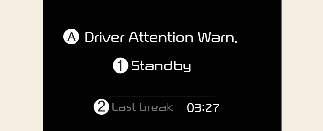
A: Driver Attention Warn.
-
Standby
-
Last Break
Driver Attention Warning enters the ready status and displays the Standby screen in the following situations.
-
The camera sensor keeps failing to detect the lanes.
-
Driving speed remains 0~180 km/h (0~112 mph)
Driver Attention Warning malfunction

A: Check Driver Attention Warning (DAW) system
When the warning message appears, the function is not working properly. In this case, have the function checked by a professional workshop. Kia recommends to visit an authorized Kia dealer/service partner.

-
Driver Attention Warning is not a substitute for safe driving practices, but a convenience function only. It is the responsibility of the driver to always drive cautiously to prevent unexpected and sudden situations from occurring. Pay attention to the road conditions at all times.
-
It may suggest a break according to the driver's driving pattern or habits even if the driver doesn't feel fatigued.
-
The driver, who feels fatigued, should take a break, even though there is no break suggestion by Driver Attention Warning.

Driver Attention Warning utilizes the front view camera on the front windshield for its operation. To keep the front view camera in the best condition, you should observe the followings:
-
Do not disassemble front view camera temporarily for tinted window or attaching any types of coatings and accessories. If you disassemble a camera and assemble it again, have the function checked by a professional workshop. Kia recommends to visit an authorized Kia dealer/service partner and have the function checked to need a calibration.
-
Do not locate any reflective objects (i.e. white paper, mirror) over the dashboard. Any light reflection may cause a malfunction of Driver Attention Warning.
-
Pay extreme caution to keep the front view camera out of water.
-
Do not arbitrarily disassemble the front view camera assembly, nor apply any impact on the front view camera assembly.
-
Playing the vehicle audio system at high volume may offset Driver Attention Warning warning sounds.

Driver Attention Warning may not properly operate with limited alerting in the following situations:
-
The lane detection performance is limited. (For more information, refer to More Details.)
-
The vehicle is violently driven or is abruptly turned for obstacle avoidance (e.g. construction area, other vehicles, fallen objects, bumpy road).
-
Forward drivability of the vehicle is severely undermined (possibly due to wide variation in tire pressures, uneven tire wear-out, toe-in/toe-out alignment).
-
The function will not operate for about 15 seconds when restarting the vehicle or initializing the front camera such as rebooting, etc.
-
Intentionally frequent lane cut-in.
-
The vehicle drives on a curvy road.
-
The vehicle drives on a bumpy road.
-
The vehicle drives through a windy area.
-
The vehicle is controlled by the following driving assist functions:
-
Forward Collision-Avoidance Assist
-
Lane Keeping Assist
-
Smart Cruise Control
-