
Lighting control
The light switch has a headlight and a position lamp position.
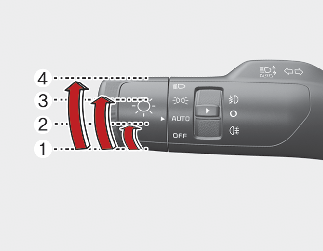
To operate the lights, turn the knob at the end of the control lever to one of the following positions:
-
OFF position
-
Auto light position
-
Position & Tail lamp
-
Headlight position
Position & Tail lamp 
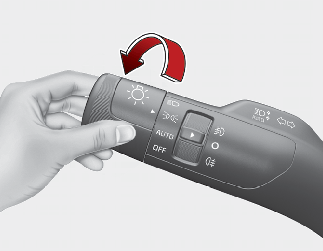
When the light switch is in the position lamp position, the front position lamp and auxiliary lamp (if equipped), tail, license light will turn ON.

Auxiliary lamp will be ON only in position lamp condition.
Head light (Low Beam) 
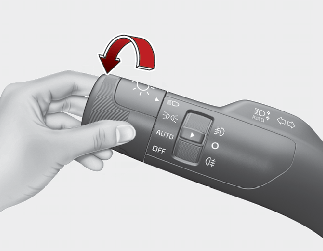
When the light switch is in the head light position, head light (low beam), tail, license light will turn ON.
The ignition switch or ENGINE START/STOP button must be in the ON position to turn on the headlights.
Auto light
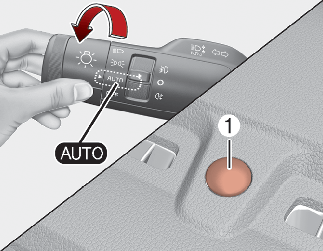
When the light switch is in the AUTO light position, the taillights and headlights will turn ON or OFF automatically depending on the amount of light outside the vehicle.

-
Never place anything over the sensor (1) located on the instrument panel as this will ensure better auto-light system control.
-
Don't clean the sensor using a window cleaner, the cleaner may leave a light film which could interfere with sensor operation.
-
If your vehicle has window tint or other types of metallic coating on the front windshield, the Auto light system may not work properly.
Operating high beam 
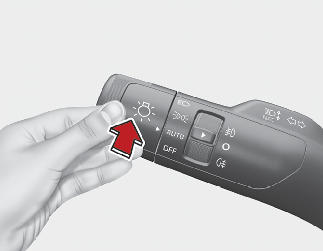
To turn on the high beam headlamp:
-
Push the lever away from you.
The lever will return to its original position.
The high beam indicator will light when the headlight high beams are switched on.
 WARNING
Do not use high beam when there are other vehicles. Using high beam could obstruct the other driver's vision.
To flash the headlights:
-
Pull the lever towards you.
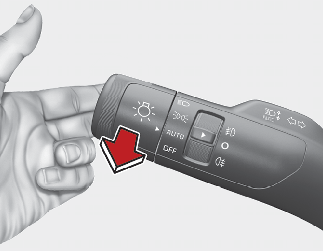
It will return to the normal (low beam) position when released. The headlight switch does not need to be on to use this flashing feature.
Operating turn signals and lane change signals
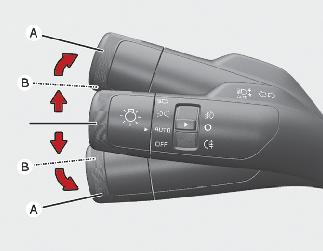
The ENGINE START/STOP button must be on for the turn signals to function.
To turn on the turn signals:
-
Move the lever up or down (A).
The green arrow indicators on the instrument panel indicate which turn signal is operating.
They will self-cancel after a turn is completed. If the indicator continues to flash after a turn, manually return the lever to the OFF position.
To signal a lane change:
-
Move the turn signal lever slightly and hold it in position (B).
The lever will return to the OFF position when released.
If an indicator stays on and does not flash or if it flashes abnormally, one of the turn signal bulbs may be burned out and will require replacement.
One-touch lane change function
To activate a one-touch lane change function, move the turn signal lever slightly and then release it. The lane change signals will blink 3, 5 or 7 times.
You can activate or deactivate the One Touch Turn Signal function or choose the number of blinking (3, 5, or 7) by selecting "User Settings →Lights → One Touch Turn signal".
If an indicator flash is abnormally quick or slow, a bulb may be burned out or have a poor electrical connection in the circuit.
Operating front fog light  (if equipped)
Fog lights are designed to provide improved visibility when visibility is poor due to fog, rain or snow, etc.
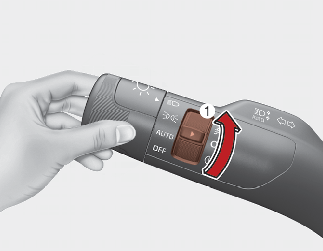
The fog lights will turn on when the fog light switch (1) is turned to the on position after the headlight is turned on.
To turn off the fog lights:
-
Turn the fog light switch (1) to the ON position.
When in operation, the fog lights consume large amounts of vehicle electrical power. Only use the fog lights when visibility is poor.
Operating rear fog light  (if equipped)
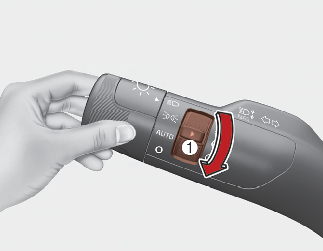
To turn the rear fog lights on, turn the rear fog light switch (1) to the on position when the headlight is turned on.
Also, the rear fog lights turn on when the rear fog light switch is turned on after the front fog light switch (if equipped) is turned on and the headlight switch is in the parking light position.
To turn the rear fog lights off:
-
Turn the rear fog light switch to the on position again.