
Intelligent Speed Limit Assist settings
Speed limit
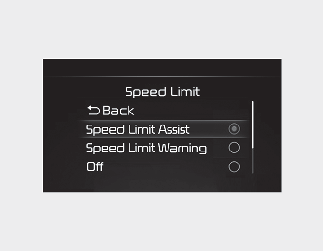
With the vehicle on, select or deselect 'Driver Assistance → Speed Limit' from the Settings menu to set whether or not to use each function.
-
If 'Speed Limit Assist' is selected, Intelligent Speed Limit Assist will inform the driver of speed limit and additional road signs. In addition, Intelligent Speed Limit Assist will inform the driver to change set speed of Smart Cruise Control to help the driver stay within the speed limit.
-
If 'Speed Limit Warning' is selected, Intelligent Speed Limit Assist will inform the driver of speed limit and additional road signs. In addition, Intelligent Speed Limit Assist will warn the driver when the vehicle is driven faster than the speed limit. Smart Cruise Control set speed will not be automatically adjusted. The driver should adjust the speed manually.
-
If 'Off' is selected, Intelligent Speed Limit Assist will turn off.
Speed limit offset
With the vehicle on, when 'Driver Assistance → Speed Limit → Speed Limit Offset' is selected, the Speed Limit Offset can be changed. Speed Limit Warning and Speed Limit Assist will operate by applying the Speed Limit Offset setting to the detected speed limit.

-
For your safety, change the Settings after parking the vehicle at a safe location.
-
Speed Limit Assist function operates based on the Offset setting added to the speed limit. If you want to change the set speed according to the speed limit, set the offset to '0'.
-
Speed Limit Warning function warns the driver when driving speed exceeds the speed at which the set Offset is added to speed limit. If you want Speed Limit Warning to warn you immediately when the driving speed exceeds the speed limit, set the offset to '0'.
-
The setting of Speed limit offset is not reflected in Navigation-based Smart Cruise Control.