
Forward Collision-Avoidance Assist settings
Forward Safety
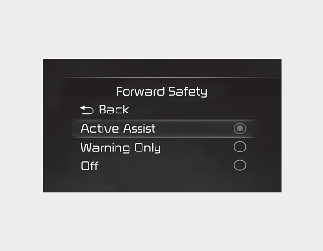
With the engine on, select or deselect 'Driver Assistance → Forward Safety' from the Settings menu to set whether or not to use each function.
-
'Active Assist': Forward Collision-Avoidance Assist will warn the driver with a warning message, an audible warning depending on the collision risk levels. Braking assist will be applied depending on the collision risk.
-
'Warning Only': Forward Collision-Avoidance Assist will warn the driver with a warning message, an audible warning depending on the collision risk levels. Braking will not be assisted. The driver must apply the brake pedal if necessary.
-
'Off': Forward Collision-Avoidance Assist will be turned off. The warning light (
 ) will appear on the cluster.
The driver can monitor Forward Collision-Avoidance Assist ON/OFF status from the Settings menu. If the warning light () remains ON when Forward Collision-Avoidance Assist is ON, have the vehicle inspected by a professional workshop. Kia recommends
to visit an authorized Kia dealer/service partner.

When the engine is restarted, Forward Collision-Avoidance Assist will always turn on. However, if 'Off' is selected, the driver should always be aware of the surroundings and drive safely.

If 'Warning Only' is selected, braking is not assisted.

Forward Collision-Avoidance Assist will turn off when ESC is turned off by pressing and holding the ESC OFF button. The warning
light () will appear on the cluster.
Warning Timing
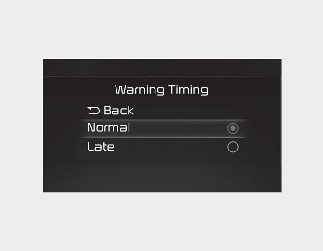
With the engine on, select 'Driver Assistance → Warning Timing' from the Settings menu to change the initial warning activation time for Forward Collision-Avoidance Assist.
To select the Warning time 'Normal' or 'Late'.
-
Normal: Use under normal driving conditions. If it feels too sensitive, set the warning timing to 'Late'.
-
Late: The warning message is notified more slowly.
Warning Volume
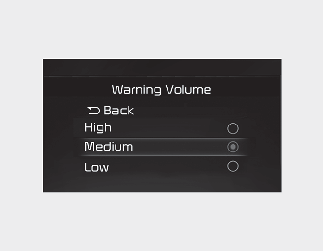
With the engine on, select 'Driver Assistance → Warning Volume from the Settings menu to change the Warning Volume to 'High', 'Medium' or 'Low' for Forward Collision-Avoidance Assist.
If you change the Warning Volume, the warning volume of other Driver Assistance systems may change.
-
The setting of the Warning Timing and Warning Volume applies to all functions of Forward Collision-Avoidance Assist.
-
Even though 'Normal' is selected for Warning Timing, if the front vehicle suddenly stops, the initial warning activation time may seem late.
-
Select 'Late' for Warning Timing when traffic is light and when driving speed is slow.
-
If the engine is restarted, Warning Timing and Warning Volume will maintain the last setting.
-
If you change the Warning Volume, the Warning Volume of other Driver Assistance systems may change.