
Reverse Parking Collision-Avoidance Assist settings
Parking Safety
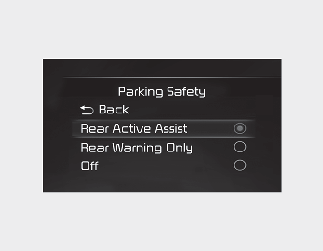
With the vehicle on, select or deselect 'Driver Assistance → Parking Safety' from the Settings menu to set whether or not to use each function.
-
If 'Rear Active Assist' (or 'Active rear assist') is selected, Reverse Parking Collision-Avoidance Assist will warn the driver and assist with braking when a collision with a pedestrian or an object is imminent.
-
If 'Rear Warning Only' (or 'Rear warning only') is selected, Reverse Parking Collision-Avoidance Assist will warn the driver when a collision with a pedestrian or an object is imminent. Braking will not be assisted.
-
If Parking Safety (
 ) button is pressed more than 2 seconds, 'Rear Active Assist' or 'Rear Warning Only' can be turned on or off.
Warning Timing
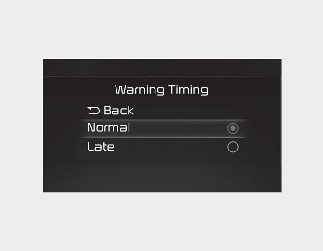
With the engine on, select 'Driver Assistance → Warning Timing' from the Settings menu to change the warning activation time of Reverse Parking Collision-Avoidance Assist to 'Normal', 'Late'.
To select the Warning time 'Normal' or 'Late'.
-
Normal: Use under normal driving conditions. If it feels too sensitive, set the warning timing to 'Late'.
-
Late: The warning message is notified more slowly.
Warning Volume
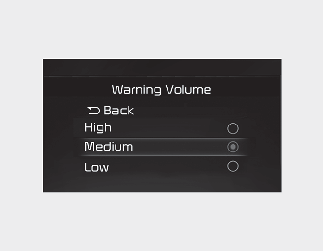
With the engine on, select 'Driver Assistance → Warning Volume from the Settings menu to change the Warning Volume to 'High', 'Medium' or 'Low' for Reverse Parking Collision-Avoidance Assist.
If you change the Warning Volume, the warning volume of other Driver Assistance systems may change.

-
The setting of the Warning Timing and Warning Volume applies to all functions of Reverse Parking Collision-Avoidance Assist.
-
Even though 'Normal' is selected for Warning Timing, if the front vehicle suddenly stops, the initial warning activation time may seem late.
-
Select 'Late' for Warning Timing when traffic is light and when driving speed is slow.

If the engine is restarted, Warning Timing and Warning Volume will maintain the last setting.