
Driver position memory system (if equipped, for power seat)
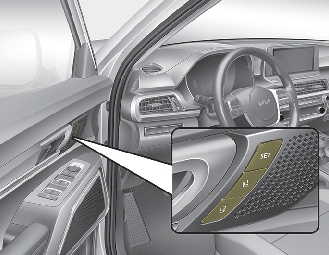
A driver position memory system is provided to store and recall the driver seat, outside rearview mirror and Head-Up Display (HUD) position with a simple button operation. By saving the desired position into the system memory, different drivers can reposition the driver seat based upon their driving preference.
If the battery is disconnected, the position memory will be erased and the driving position should be restored in the system.
Driver seat/outside rearview mirror: location
Head-Up Display (HUD): height

Never attempt to operate the driver position memory system while the vehicle is moving.
This could result in loss of control, and an accident causing death, serious injury, or property damage.

The driver position memory system requires a large amount of electric power.
Refrain from using the system when the engine is stopped to prevent battery discharge.
Storing positions into memory using the buttons on the door
-
Place the ENGINE START/STOP button is ON while the vehicle stop.
-
Adjust the driver’s seat and outside rearview mirror comfortable for the driver.
-
Press SET button on the control panel. The system will beep once.
-
Press one of the memory buttons (1 or 2) within 4 seconds after pressing the SET button. The system will beep twice when memory has been successfully stored.
-
Operate following steps while vehicle stop.
-
To recall the position in the memory, press the desired memory button (1 or 2). The system will beep once, then the driver’s seat will automatically adjust to the stored position.
Adjusting the control switch for the driver’s seat while the system is recalling the stored position will cause the movement to stop and move in the direction that the control switch is moved.
Use caution when recalling the adjustment memory while sitting in the vehicle. Push the seat position control switch to the desired position immediately if the seat moves too far in any direction.
Easy access function (if equipped)
The driver can turn off or set the driver's seat settings directly.
User setting mode in the instrument cluster:The system will move the driver's seat automatically as follows:
-
For the driver's seat settings, "Convenience → Seat Easy Access → Off / Normal / Extend", and "Convenience → Seat upward/downward"
-
It will move the driver’s seat rearward when the ENGINE START/STOP button is changed to the OFF position and front driver’s door is opened.
-
will move the driver’s seat forward when the ENGINE START/STOP button is changed to the ACC or START position and front driver’s Door is opened.
-
It will move the driver's seat forward when you get in your vehicle with the smart key after closing the driver's door.
You can activate or deactivate this feature. Refer to "User settings" in chapter 4.

Upward / downward movement of the seat may not work when passengers get on/off the vehicle in order to prevent foot injuries in certain places.
Driver position memory system reset
If the Driver position memory system reset fails to work, initialize the system as follows.
How to initialize:
-
Stop the car and open the driver’s door with the ENGINE START/STOP button in ON and the automatic shift lever in P(parking) position.
-
Pull the driver’s seat forward as far as possible and have the seatback upright as much as possible using driver’s seat forward/backward adjustment and seatback angle (recline) movement switches.
-
Push SET button and and seat fore movement switch button for 2 seconds simultaneously.
Initialization in the process :
-
Initialization begins as the alarm sounds.
-
The seat and seatback will automatically move backwards. The alarm sound will continue while the system is in operation.
-
Initialization will be all set after the seat and seatback move to the center with alarm sound being raised. If, however, cases as follows occur, the initialization process will come to a stop and the alarm sound will stop as well.
-
When pushing driving position memory system button
-
When pushing driver’s seat height adjustment switch
-
When the driving speed exceeds 3km/h
-
When the driver’s door is closed
-
-
When the operation of the driver's seat and alarm sound stop during the initialization process, start the process again.
-
Make sure that there are no obstacles around the driver's seat before starting initialization.
-
When the initialization is finished, adjust the seat to suit the driver's body and save it back to the driver position memory system.