
Smart key
Record your key number
Smart key function
To remove the mechanical key, press and hold the release button (1) and remove the mechanical key (2).
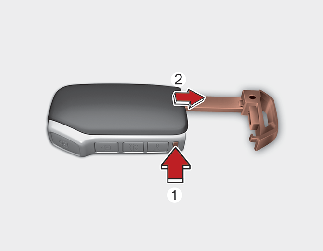
To reinstall the mechanical key, put the key into the hole and push it until a click sound is heard.
With a smart key, you can lock or unlock a door (and liftgate) and start the vehicle.
Refer to the following for more details.

Smart key
Never leave the keys in your vehicle with unsupervised children. Leaving children unattended in a vehicle with the Smart key is dangerous even if the start button is not in the ACC or ON position. Children copy adults and they could press the start button. The key would enable children to operate power windows or other controls, or even make the vehicle move, which could result in serious bodily injury or death.
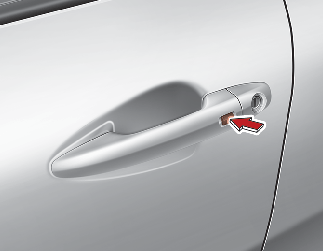
Pressing the button of the front outside door handles with all doors (and liftgate) closed and any door unlocked, locks all the doors (and liftgate).
The hazard warning lights will blink once to indicate that all doors (and liftgate) are locked. The button will only operate when the smart key is within 0.7~1 m (28~40 in) from the outside door handle. If you want to make sure that a door has locked or not, you should check the door lock button inside the vehicle or pull the outside door handle.
Even though you press the button, the doors will not lock and an audible chime will sound if any of the following occurs:
-
The smart key is in the vehicle.
-
The POWER button is in the ACC or ON position.
-
Any door except the liftgate is opened.
Pressing the button of the front outside door handles with all doors (and liftgate) closed and locked, unlocks all the doors (and liftgate).
The hazard warning lights will blink twice to indicate that all doors (and liftgate) are unlocked. The button will only operate when the smart key is within 0.7~1 m (28~40 in) from the outside door handle.
When 2-press unlock function is activated,
-
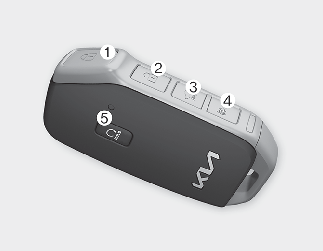
If you press the Door Unlock button (2) on the smart key, driver's door will unlock.
-
If you press Door Unlock button (2) on the smart key within four seconds again, then all the doors will unlock.
-
If you press the driver's outside door handle button, driver's door will unlock.
-
If you press the driver's outside door handle button within four seconds again, then all the doors will unlock.

You can activate or deactivate the 2-press unlock function. Refer to More Details.
To open:
-
Make sure you have the smart key in your possession.
-
Pressing the button (3) on the smart key will only unlock the lift-gate.
-
Once the liftgate is opened and then closed, the liftgate will lock automatically.
The liftgate unlock will only operate when the smart key is within 0.7~1 m (28-40 inches) from the liftgate.
-
Press the panic button (4) for more than 1 second.
-
The horn sounds and hazard warning light flash for about 27 seconds.
To stop the horn and lights, press any button on the smart key.
You can start the vehicle using the remote start button (5) of the smart key.
To start the vehicle remotely:
-
Lock the doors by pressing the door lock button (1) within 10 m 32 feet) distance from the vehicle.
-
Press the remote start button (5) for over 2 seconds within 4 seconds after locking the doors.
Press the remote start button (5) once to turn off the vehicle.Air conditioner/heater system maintains the status before turning off the vehicle. If no further action for operating/driving the vehicle is taken, the vehicle will be turned off 10 minutes after starting the vehicle remotely.

-
Laws in your country may restrict the use of remote start. You should check country regulations before using this remote starting system.
-
It is only possible to start the vehicle remotely when shifted to P (Park).
-
If the hood or the liftgate is opened, you cannot start the vehicle remotely.
You can start the vehicle without inserting the key.
* For information, refer to More Details.
Loss of the smart key
A maximum of 2 smart keys can be registered to a single vehicle.
If you happen to lose your smart key, you will not be able to start the vehicle. You should immediately take the vehicle and remaining key to your authorized Kia dealer (tow the vehicle, if necessary) to protect it from potential theft.
Smart key precautions
The smart key will not work if any of the following occur:
-
The smart key is close to a radio transmitter such as a radio station or an airport which can interfere with normal operation of the smart key.
-
The smart key is near a mobile two way radio system or a cellular phone.
-
Another vehicle's smart key is being operated close to your vehicle.
When the smart key does not work correctly, open and close the door with the mechanical key and contact an authorized Kia dealer.
If the smart key is in close proximity to your cell phone or smart phone, the signal from the smart key could be blocked by normal operation of your cell phone or smart phone. This is especially important when the phone is active such as making calls, receiving calls, text messaging, and/or sending/receiving emails. Avoid placing the smart key and your cell phone or smart phone in the same pants or jacket pocket and maintain adequate distance between the two devices.
Smart key
Keep the smart key away from water or any liquid, as it can become damaged and not function properly if wet.
If the smart key is inoperative due to exposure to water or liquids, it will not be covered by your manufacturer's vehicle warranty.