
Detecting sensors (Front view camera/Front radar)
The sensors are that detecting the distance to vehicles ahead, pedestrian or cyclist.
In bad weather conditions such as heavy rain, heavy snow, and fog, or when sensor is covered by foreign material, dust, etc., the sensors will be degraded and the function will be temporarily disabled.
Always keep the sensor clean.
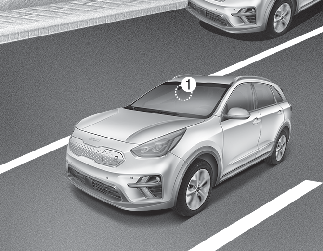
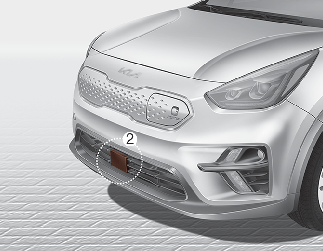
[1] : Front view camera [2] : Front radar

-
Do not apply foreign objects, such as a bumper sticker or a bumper guard, near the radar sensor.
Doing so may adversely affect the sensing performance of the radar.
-
Always keep the radar sensor and over clean and free of dirt and debris.
-
Use only soft clothes to wash the vehicle. Do not spray pressurized water directly on the sensor or sensor cover.
-
Be careful not to apply unnecessary force on the radar sensor or sensor cover. If the sensor is forcibly moved out of proper alignment, Forward Collision-Avoidance Assist may not operate correctly. In this case, a warning message may not be displayed. Have the vehicle inspected by an authorized Kia dealer.
-
If the front bumper becomes damaged in the area around the radar sensor, Forward Collision-Avoidance Assist may not operate properly. In this case, have your vehicle inspected by an authorized Kia dealer.
-
Use only genuine parts to repair or replace a damaged sensor or sensor cover. Do not apply paint to the sensor cover.
-
Do not tint the window or install stickers or accessories around the inside mirror where the camera is installed.
-
Make sure the frontal camera installation point does not get wet.
-
Do not impact or remove any radar/camera components.
-
Do not place reflective objects (white paper or mirror etc.) on the dashboard. The function may activate unnecessarily due to reflection of the sunlight.
-
Excessive audio system volume may prevent occupants from hearing Forward Collision-Avoidance Assist warning alarm.