
Limitations of the Smart Cruise Control
Driving on a curve
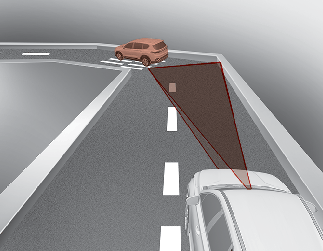
On curves, Smart Cruise Control may not immediately detect a moving vehicle in your lane, and then your vehicle could accelerate to the set speed. Also, the vehicle speed will rapidly decrease when the vehicle ahead is recognized suddenly.
Select the appropriate set speed on curves and adjust your vehicle speed by depressing the accelerator or brake pedal according to the road and driving conditions ahead.
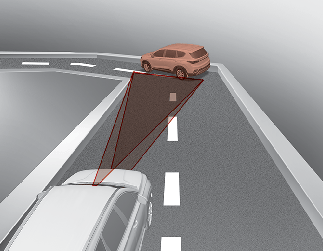
Your vehicle speed can be reduced due to a vehicle in the adjacent lane. Adjust your vehicle speed by depressing the brake pedal according to the road and driving conditions ahead.
Adjust your speed by depressing the brake pedal or applying the accelerator pedal according to road and driving conditions ahead. Check to be sure that the road conditions permit safe operation of Smart Cruise Control.
Driving on a slope
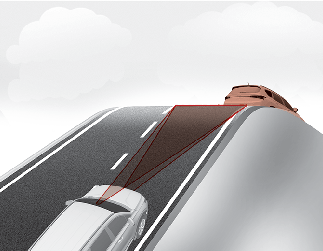
During uphill or downhill driving, Smart Cruise Control may not immediately detect a moving vehicle in your lane, and may cause your vehicle to accelerate to the set speed.
Also, the vehicle speed will rapidly down when the vehicle ahead is recognized suddenly.
Select the appropriate set speed on inclines and adjust your vehicle speed by depressing the accelerator or brake pedal according to the road and driving conditions ahead.
Changing lanes
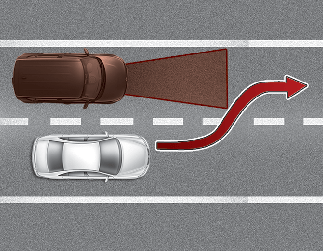
A vehicle which moves into your lane from an adjacent lane cannot be recognized by the sensor until it is in the sensor's detection range.
The sensor may not detect immediately when a vehicle cuts in suddenly. Always pay attention to the traffic, road and driving conditions.
If a vehicle which moves into your lane is slower than your vehicle, your speed may decrease to maintain the distance to the vehicle ahead.
If a vehicle which moves into your lane is faster than your vehicle, your vehicle will accelerate to the selected speed.
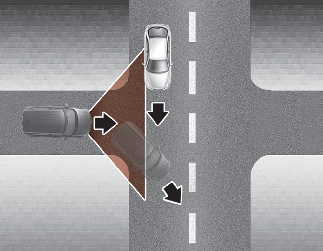
Your vehicle may accelerate when a vehicle ahead of you disappears.
When you are warned that the vehicle ahead of you is not detected, drive with caution.
Recognizing the vehicle
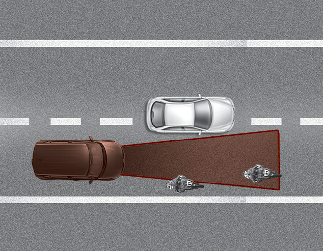
Some vehicles ahead in your lane cannot be recognized by the sensor as follows:
-
Narrow vehicles such as motorcycles or bicycles
-
Vehicles offset to one side
-
Slow-moving vehicles or sudden-decelerating vehicles
-
Stopped vehicles
-
Vehicles with small rear profiles such as trailers with no loads
A vehicle ahead cannot be recognized correctly by the sensor if any of following occurs:
-
When the vehicle is pointing upwards due to overloading in the liftgate
-
While making turns by steering
-
When driving to one side of the lane
-
When driving on narrow lanes or on curves
Adjust your vehicle speed by depressing the brake pedal according to the road and driving conditions ahead.
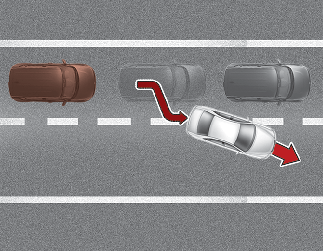
When vehicles are at a standstill and the vehicle in front of you changes to the next lane, be careful when your vehicle starts to move because it may not immediately recognize the stopped vehicle in front of you.
In this case, you must maintain a safe braking distance, and if necessary, depress the brake pedal to reduce your driving speed in order to maintain a safe distance.
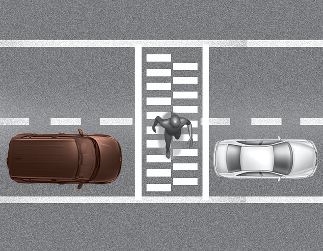
Always look out for pedestrians when your vehicle is maintaining a distance with the vehicle ahead.
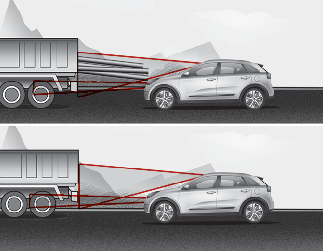
Always be cautious when approaching vehicles that are taller with higher clearance, or vehicles carrying loads that stick out of the back of the vehicle.

-
Smart Cruise Control cannot guarantee stopping for every emergency situation. If an emergency stop is necessary, you must apply the brakes.
-
Keep a safe distance according to road conditions and vehicle speed. If the vehicle distance is too close during high-speed driving, a serious collision may result.
-
Smart Cruise Control cannot recognize a stopped vehicle, pedestrians or an oncoming vehicle. Always look ahead cautiously to react to unexpected and sudden situations.
-
Smart Cruise Control may have difficulty in maintaining the correct distance or speed, if the vehicle is driving on a steep incline or towing a trailer.
-
When other vehicles are changing lanes in front of you frequently, Smart Cruise Control may not operate appropriately. Always look ahead cautiously to react to unexpected and sudden situations.
-
Smart Cruise Control is not a substitute for safe driving practices but a convenience function only. It is the responsibility of the driver to always check the speed and the distance to the vehicle ahead.
-
Always be aware of the selected speed and vehicle distance.
-
Always maintain sufficient braking distance and decelerate your vehicle by applying the brakes if necessary.
-
As Smart Cruise Control may not recognize complex driving situations, always pay attention to driving conditions and control your vehicle speed.
-
For safe operation, carefully read and follow the instructions in this manual before use.
-
If another warning sound, such as the fasten seat belt warning, is played, Smart Cruise Control warning sound may not occur.
-
When driving with Smart Cruise Control set, the function may not detect parked vehicles ahead. Be careful if this occurs and do not rely solely on Smart Cruise Control function.
-
Please turn off Smart Cruise Control when the vehicle is being towed.
-
If the vehicle ahead is no longer detected while you are driving with the set distance, the vehicle may accelerate until it reached the set speed. If this occurs, be cautious and control your vehicle speed if needed.
-
Be cautious and be careful of dangerous situations when driving on a slippery road.
-
Beware of dangerous situations as you may quickly pass the vehicle driving in the next lane.

Smart Cruise Control may not operate temporarily due to:
-
Electrical interference.
-
A modified suspension.
-
Differences of tire abrasion or tire pressure.
-
Installing different type of tires.