
Driving Rear View (DRV) function (if equipped)
Driving Rear View function is used to switch on Rear View Monitor when driving forward.
You can turn on the function in DRV menu in the infotainment system or Parking/View button (1).
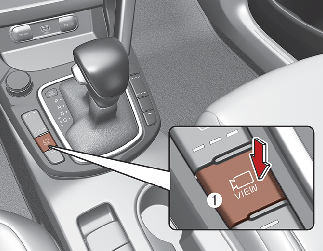
Operating conditions
-
The ENGINE START/STOP button is ON.
-
The Parking/view button is pressed when gearshift status is D (Drive), N (Neutral).
Off conditions
-
Parking/view button is pressed again.
-
One of the infotainment system button is pressed.
-
If the gear is shifted to P (park), the function is turned off.
When operating
-
If the gear is shifted to R (Reverse), whilst Rear view whilst driving is displayed on the screen, the screen will change to rear view.
-
In the following conditions, a warning light is displayed on the cluster LCD screen.
-
When the tailgate is opened.
-
When the driver or passenger door is opened.
-

-
This function is a supplementary function only. It is the responsibility of the driver to always check the inside/outside rear view mirror and the area behind the vehicle before and while backing up because there is a dead zone that can't be seen through the camera.
-
If the camera lens is covered with foreign material, Rear View Monitor may not operate normally. Always keep the camera lens clean. However, do not use chemical solvents such as strong detergents containing high alkaline or volatile organic solvents (gasoline, acetoneetc.). This may damage the camera lens.