
Smart Cruise Control speed
To set Smart Cruise Control speed
-
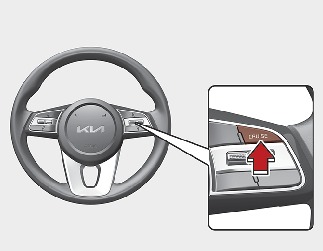
Push the Driving Assist button on the steering wheel to turn the function on. The cruise indicator will illuminate.
-
Accelerate to the desired speed. Smart Cruise Control speed can be set as follows:
-
10 km/h (5 mph) ~ 180 km/h (110 mph): when there is no vehicle in front
-
0 km/h (0 mph) ~ 180 km/h (110 mph): when there is a vehicle in front
-
-
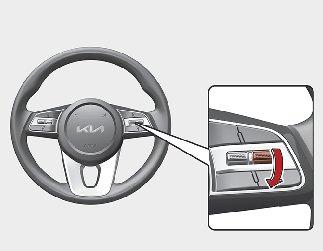
Push down the SET- switch. The Set Speed and Vehicle distance on the LCD display will illuminate.
-
Release the accelerator pedal. The desired speed will automatically be maintained.
If there is a vehicle in front of you, the speed may decrease to maintain the distance to the vehicle ahead.
On a steep grade, the vehicle may slow down or speed up slightly while going uphill or downhill.

-
Vehicle speed may decrease on an upward slope and increase on a downward slope.
-
If the vehicle speed is less than 30 km/h (20 mph) and Smart Cruise Control is operated, the smart cruise control speed will be set to 30 km/h (20 mph).
To increase Smart Cruise Control set speed
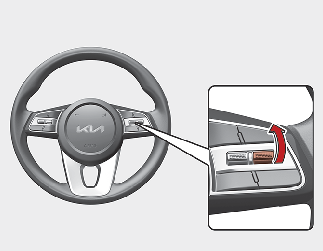
Follow either of these procedures:
-
Push up the RES+ switch, and release it immediately. The cruising speed will increase by 1 km/h (1 mph) each time you move the switch up in this manner.
-
Push up the RES+ switch, and hold it. Your vehicle set speed will increase by 10 km/h (5 mph). Release the switch at the speed you want.
-
You can set the speed to 180 km/h (110 mph).

Check the driving condition before using the switch. Driving speed sharply increases, when you push up and hold the switch.
To decrease Smart Cruise Control set speed
Follow either of these procedures:
-
Push down the SET- switch, and release it immediately. The cruising speed will decrease by 1 km/h (1 mph) each time you move the switch down in this manner.
-
Push down the SET- switch, and hold it. Your vehicle set speed will decrease by 10 km/h (5 mph). Release the switch at the speed you want.
-
You can set the speed to 30 km/h (20 mph).
To temporarily accelerate with Smart Cruise Control on
If you want to speed up temporarily when Smart Cruise Control is on, depress the accelerator pedal. Increased speed will not interfere with Smart Cruise Control operation or change the set speed.
To return to the set speed, take your foot off the accelerator pedal.
If you push down the SET- switch at increased speed, the set speed is updated.
Be careful when accelerating temporarily, because the speed is not controlled automatically at this time even if there is a vehicle in front of you.
Smart Cruise Control will be temporarily canceled when:
Canceled manually
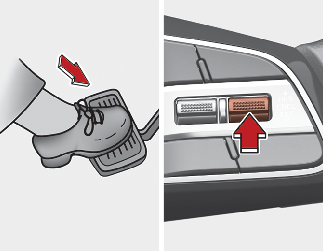
Depressing the brake pedal.
Pushing the CANCEL button located on the steering wheel.
Smart Cruise Control turns off temporarily when the Set Speed and Vehicle-to-Vehicle Distance indicator on the LCD display turns off.
The cruise indicator is illuminated continuously.
Canceled automatically
-
The driver's door is opened.
-
The shift lever is shifted to N (Neutral), R (Reverse) or P (Park).
-
The parking brake is applied.
-
The vehicle speed is over 190 km/h (120 mph).
-
The ESC (Electronic Stability Control), TCS (Traction Control System) or ABS is operating.
-
The ESC is turned off.
-
The sensor or the cover is dirty or blocked with foreign matter.
-
The vehicle is stopped for a certain period of time.
-
The vehicle speed is under 10 km/h (5 mph).
-
The vehicle stops and goes repeatedly for a long period of time.
-
The accelerator pedal is continuously depressed for a long period of time.
-
The accelerator pedal is continuously depressed for more than one minute.
-
The engine performance is abnormal.
-
Engine rpm is in the red zone.
-
The driver starts driving by pushing the RES+/SET- button or depressing the accelerator pedal, after the vehicle is stopped by Smart Cruise Control with no other vehicle ahead.
-
The driver starts driving by pushing the RES+/SET- button or depressing the accelerator pedal, after stopping the vehicle with a vehicle stopped far away in front.
-
Forward Collision-Avoidance Assist is activated.
-
The engine speed is in dangerous range.
-
When the braking control is operated for Forward Collision-Avoidance Assist.
-
The engine speed is in dangerous range.
Each of these actions will cancel Smart Cruise Control operation. The Set Speed and Vehicle-to-Vehicle Distance on the LCD display will go off.
In a condition Smart Cruise Control is canceled automatically, Smart Cruise Control will not resume even though the RES+ or SET- switch is pushed.
If Smart Cruise Control is canceled by other than the reasons mentioned, we recommend that the function be checked by an authorized Kia dealer/service partner.
Smart Cruise Control canceled
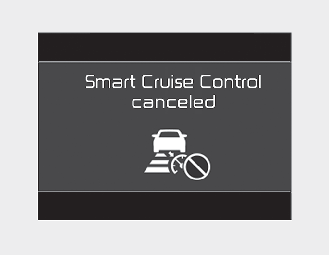
If the function is canceled, the warning chime will sound and a message will appear for a few seconds.
You must adjust the vehicle speed by depressing the accelerator or brake pedal according to the road condition ahead and driving condition.
Always check the road conditions. Do not rely on the warning chime.
To resume Smart Cruise Control set speed
If any method other than the cruise switch was used to cancel cruising speed and the function is still activated, the cruising speed will automatically resume when you push the RES+/SET- switch.
If you push up the RES+ switch, the speed will resume to the recently set speed. However, if vehicle speed drops below 10 km/h (20 mph), it will resume when there is a vehicle in front of your vehicle.
Always check the road conditions when you push up the RES+ switch to resume speed.
To turn Cruise Control off
Pushing the Driving Assist button. The cruise indicator will go off.
If you wish not to use Cruise Control, always turn the function off by pushing the Driving Assist button.

Take the following precautions :
-
Always set the vehicle speed under the speed limit in your country.
-
If Smart Cruise Control is left on, (
 indicator light in the instrument cluster is illuminated) Smart Cruise Control can be activated unintentionally. Keep Smart
Cruise Control off ( indicator light OFF) when Smart Cruise Control is not in use, to avoid inadvertently setting a speed.
indicator light in the instrument cluster is illuminated) Smart Cruise Control can be activated unintentionally. Keep Smart
Cruise Control off ( indicator light OFF) when Smart Cruise Control is not in use, to avoid inadvertently setting a speed.
-
Use Smart Cruise Control only when traveling on open highways in good weather.
-
Do not use Smart Cruise Control when it may not be safe to keep the vehicle at a constant speed:
-
When driving in heavy traffic or when traffic conditions make it difficult to drive at a constant speed
-
When driving on rainy, icy, or snow-covered roads
-
When driving on hilly or windy roads
-
When driving in windy areas
-
When driving in parking lots
-
When driving near crash barriers
-
When driving on a sharp curve
-
When driving with limited view (possibly due to bad weather, such as fog, snow, rain or sandstorm)
-
When the vehicle sensing ability decreases due to vehicle modification resulting level difference of the vehicle's front and rear
-
-
Unexpected situations may lead to possible accidents. Pay attention continuously to road conditions and driving even when Smart Cruise Control is being operated.
To adjust the sensitivity of Smart Cruise Control
-
Smart Cruise Control responsiveness is not tied to the person
-
Fast: Vehicle speed following the front vehicle to maintain the set distance is faster than normal speed.
-
Normal: Vehicle speed following the front vehicle to maintain the set distance is normal.
-
Slow: Vehicle speed following the front vehicle to maintain the set distance is slower than normal speed.
-
-
DRIVE MODE switch
Smart Cruise Control sensitivity changes when the 'DRIVE MODE' switch is operated.
The last selected Smart Cruise Control sensitivity is remained in the function.
|
Drive Mode |
The sensitivity of Smart Cruise Control |
|---|---|
|
1. NORMAL |
Normal |
|
2. ECO |
Slow |
|
3. SPORT |
Fast |