
Sensor to detect distance to the vehicle ahead
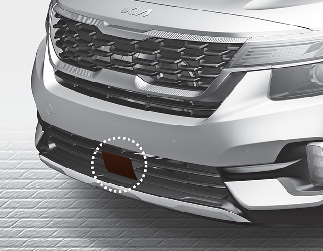
Smart Cruise Control uses a front radar to detect distance to the vehicle ahead.
If the radar sensor is covered with dirt or other foreign matter, the vehicle distance control may not operate correctly.
Always keep the radar sensor clean.
Warning message
Smart Cruise Control disabled. Radar blocked
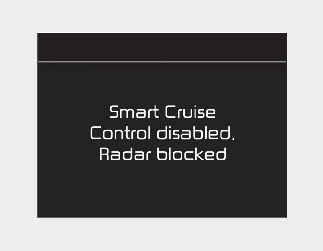
When the sensor lens cover is blocked with dirt, snow, or debris, Smart Cruise Control operation may stop temporarily. If this occurs, a warning message will appear on the LCD display. Remove any dirt, snow, or debris and clean the radar sensor lens cover before operating Smart Cruise Control.
Smart Cruise Control may not properly activate, if the radar is totally contaminated, or if any substance is not detected after turning ON the engine (e.g. in an open terrain).

For Smart Cruise Control operation is temporarily stopped if the radar is blocked, but you wish to use cruise control mode (speed control function), you must convert to the cruise control mode (refer to More Details.

-
Do not apply license plate frame or foreign objects such as a bumper sticker or a bumper guard near the radar sensor. Doing so may adversely affect the sensing performance of the radar.
-
Always keep the radar sensor and lens cover clean and free of dirt and debris.
-
Use only a soft cloth to wash the vehicle. Do not spray pressurized water directly on the sensor or sensor cover.
-
Be careful not to apply unnecessary force on the radar sensor or sensor cover. If the sensor is forcibly moved out of proper alignment, Smart Cruise Control may not operate correctly. In this case, a warning message may not be displayed. Have the vehicle inspected by an authorized Kia dealer/service partner.
-
If the front bumper becomes damaged in the area around the radar sensor, Smart Cruise Control may not operate properly. We recommend that you have the vehicle inspected by an authorized Kia dealer/service partner.
-
Use only Kia parts to repair or replace a damaged sensor or sensor cover. Do not apply paint to the sensor cover.
Check Smart Cruise Control System
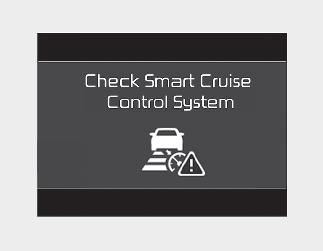
The message will appear when the vehicle distance control function is not functioning normally.
We recommend that you take your vehicle to an authorized Kia dealer/service partner and have the function checked.