
Detecting Sensors
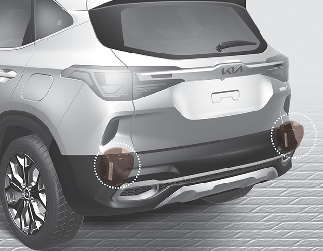
The rear corner radars are the sensors inside the rear bumper for detecting the side and rear areas. Always keep the rear bumper clean for proper operation of the function.

-
The function may not work properly when the bumper has been damaged, or if the rear bumper has been replaced or repaired.
-
The function may turn off due to strong electromagnetic waves.
-
Always keep the sensors clean.
-
NEVER arbitrarily disassemble the sensor component nor apply any impact on the sensor component.
-
Be careful not to apply unnecessary force on the radar sensor or sensor cover. If the sensor is forcibly moved out of proper alignment, the function may not operate correctly. In this case, a warning message may not be displayed. Have the vehicle inspected by an authorized Kia dealer/service partner.
-
Do not apply foreign objects such as a bumper sticker or a bumper guard near the radar sensor or apply paint to the sensor area.
Doing so may adversely affect the performance of the sensor.
Warning message
Blind-Spot Collision Warning (BCW) system disabled. Radar blocked
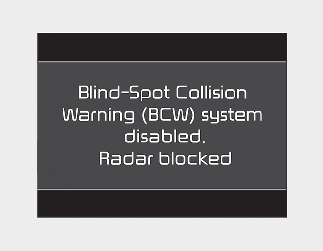
This warning message may appear when:
-
One or both of the sensors on the rear bumper is blocked by dirt or snow or a foreign object.
-
A trailer or carrier is installed.
-
Driving in rural areas where the sensor does not detect another vehicle for an extended period of time.
-
When there is inclement weather such as heavy snow or rain.
If any of these conditions occur, the function will turn off automatically.
When Blind-Spot Collision Warning canceled warning message is displayed in the cluster, check to make sure that the rear bumper is free from any dirt or snow in the areas where the sensor is located. Remove any dirt, snow, or foreign material that could interfere with the radar sensors.
After any dirt or debris is removed, the function should operate normally after about 10 minutes of driving the vehicle.
If the function still does not operate normally have your vehicle inspected by an authorized Kia dealer/service partner.

Turn off Blind-Spot Collision Warning and Rear Cross-Traffic Collision Warning when a trailer or carrier is installed.
-
Deactivate Blind-Spot Collision Warning by deselecting 'User Settings → Driver Assistance → Blind-Spot Safety → Off' (if equipped) in the cluster or infotainment system.
-
Deactivate Rear Cross-Traffic Collision Warning by deselecting "User settings → Driver Assistance → Parking Safety → Rear Cross-Traffic Safety" in the cluster or infotainment system.
Check Blind-Spot Collision Warning (BCW) system
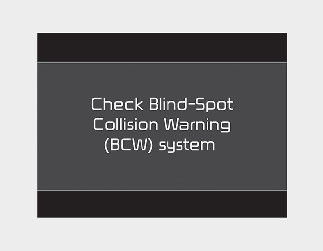
If there is a problem with Blind-Spot Collision Warning function, a warning message will appear. The function will turn off automatically. Rear Cross-Traffic Collision Warning will not operate also if Blind-Spot Collision Warning turns off due to malfunction. We recommend that you have your vehicle inspected by an authorized Kia dealer/service partner.