Search by Title only
Home > Driving your vehicle > All Wheel Drive (AWD) system > AWD mode

AWD mode

AWD helps the vehicle's performance by controlling 4 wheels.

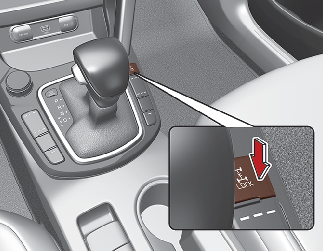
You can switch from AWD AUTO mode to AWD Lock mode by pressing AWD Lock mode switch.

AWD transfer mode selection

Transfer mode

Selection button

Indicator light

Description

AWD AUTO

-

  • AWD AUTO is used when driving on roads in normal conditions, roads in urban areas, and on highways.

  • All wheels are in operation when a vehicle travels at a constant speed. Required tractions are applied on front and rear wheels vary depending on road and driving conditions, which will be automatically controlled by the computing system.

  • When the cluster's AWD Auto display mode is selected, the cluster displays the status of how four wheels’ traction forces are distributed.

AWD LOCK

  • The main goal of AWD Lock mode is to allow a driver to maximize the vehicle’s traction under extreme driving conditions such as unpaved off-road, sandy roads, and muddy roads.

  • AWD Lock mode is in operation only when a vehicle travels at 60km/h (38 mph) or less. When traveling at 60km/h (38 mph) or faster, the mode will switch to AWD Auto.

  • When AWD Lock mode illuminates, the cluster does not display the front/rear wheel traction force distribution status.

  • Press the AWD Lock mode switch again to switch back to AWD Auto.

NOTICE

Normal road conditions

  • Maintain AWD Auto mode when driving on roads in normal conditions.

  • When driving under normal road conditions (especially when cornering) in AWD Lock mode, a driver may find minor mechanical vibration or noise, which is extremely normal phenomenon, not a malfunction. When AWD Lock mode is released, such noise or vibration will be immediately gone.