
Forward Collision-Avoidance Assist settings
Setting features
Forward Safety
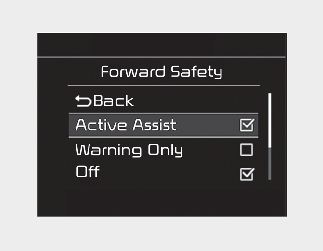
The driver can activate Forward Collision-Avoidance Assist by placing the ignition switch to the ON position and by selecting on the LCD display 'User Settings → Driver Assistance → Forward Safety’:
-
If you select "Active Assist", Forward Collision-Avoidance Assist activates. Forward Collision-Avoidance Assist produces warning messages and warning alarms in accordance with the collision risk levels. Also, it controls the brakes in accordance with the collision risk levels.
-
If you select "Warning Only", Forward Collision-Avoidance Assist activates and produces only warning alarms in accordance with the collision risk levels. You should control the brake directly because Forward Collision-Avoidance Assist does not control the brake.
-
If you select "Off", Forward Collision-Avoidance Assist deactivates.

Warning Timing
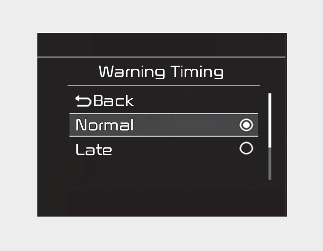
The driver can select the initial warning activation time on the LCD display or infotainment function display.
Go to the 'User Settings → Driver Assistance → Warning Timing → Normal/Late'.
The options for the initial Forward Collision Warning includes the following:
-
Normal: When this condition is selected, the initial Forward Collision Warning is activated sensitively. If you feel the warning activates too early, set Forward Collision Warning to 'Late'.
Even though, 'Normal' is selected if the front vehicle suddenly stops the initial warning activation time may not seem fast.
-
Late: When this condition is selected, the initial Forward Collision Warning is activated later than normal. This setting reduces the amount of distance between the vehicle or pedestrian ahead before the initial warning occurs.
Select 'Late' when traffic is light and when driving speed is slow.

If you change the warning timing, the warning time of other functions may change. Always be aware before changing the warning timing.
Warning Volume
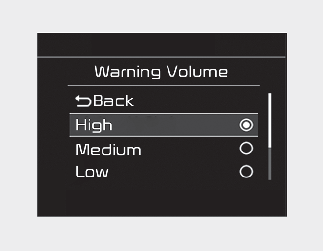
The driver can select the warning volume of Forward Collision Warning in the User Settings in the LCD display by selecting 'User Settings → Driver Assistance → Warning volume → High/Medium/Low'.
If you change the warning volume, the warning volume of other functions may change. Always be aware before changing the warning volume.
Prerequisite for activation
Forward Collision-Avoidance Assist gets ready to be activated, when Forward Collision-Avoidance Assist is selected on the LCD display or infotainment function display, and when the following prerequisites are satisfied.
-
The ESC (Electronic Stability Control) is on.
-
Vehicle speed is over 10 km/h (6 mph). (Forward Collision-Avoidance Assist is only activated within a certain speed range.)
-
The function detects a vehicle or pedestrian in front, which may collide with your vehicle. (Forward Collision-Avoidance Assist may not be activated or may sound a warning alarm in accordance with the driving situation or vehicle condition.)

-
Completely stop the vehicle on a safe location before operating the switch on the steering wheel to activate/deactivate Forward Collision-Avoidance Assist.
-
Forward Collision-Avoidance Assist automatically activates upon placing the ignition switch to the ON position. The driver can deactivate Forward Collision-Avoidance Assist by canceling the function setting on the LCD display or infotainment function display.
-
Forward Collision-Avoidance Assist automatically deactivates upon canceling the ESC (Electronic Stability Control). When the ESC is canceled, Forward Collision-Avoidance Assist cannot be activated on the LCD display or infotainment function display. Forward Safety warning light will illuminate which is normal. At this time, Forward Collision-Avoidance Assist cannot be set even in instrument cluster or infotainment function user setting mode.