
LCD display messages
Press brake pedal to start vehicle
This warning message is displayed if the START/STOP button changes to the ACC position twice by pressing the button repeatedly without depressing the brake pedal.
You can start the vehicle by depressing the brake pedal.
Key not in vehicle
The warning message will be displayed if the power of the vehicle is not OFF and the door is opened or closed without your smart key being inside the vehicle.
When attempting to start the vehicle, always have the smart key with you.
Key not detected
This warning message is displayed if the smart key is not detected when you press the START/STOP button.
Press START/STOP button again
This message is displayed if you were unable to start the vehicle when the START/STOP button was pressed.
If this occurs, attempt to start the vehicle by pressing the START/STOP button again.
If the warning message appears each time you press the START/STOP button, have your vehicle inspected by an authorized Kia dealer.
Press START/STOP button with key
This warning message is displayed if you press the START/STOP button while the warning message "Key not detected" is displayed.
Check BRAKE SWITCH fuse
This warning message is displayed if the brake switch fuse is disconnected.
You need to replace the fuse with a new one before starting the vehicle.
If that is not possible, you can start the vehicle by pressing the START/STOP button for 10 seconds in the ACC position.
Shift to P to start vehicle
This warning message is displayed if you try to start the vehicle without shifting to the P (Park) position.
Shift to P
This warning message is displayed if you try to turn off the vehicle with the gear in the N (Neutral) position.
At this time, the START/STOP button changes to the ACC position (If you press the START/STOP button once more, it will turn to the ON position).
Low Key Battery
This warning message is displayed if the battery of the smart key is discharged while changing the START/STOP button to the OFF position.
Battery discharging due to external electrical devices
This message is displayed if the battery voltage is weak due to any nonfactory electrical accessories (ex. dashboard camera). Be careful that the battery is not discharged.
If the warning message appears after removing the non-factory electrical accessories, have your vehicle inspected by an authorized Kia dealer.
Door, Hood, Liftgate open warning display
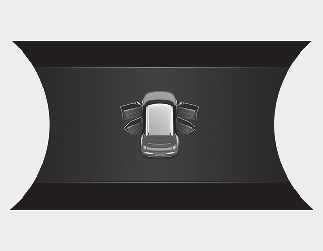
This warning is displayed if any door or the hood or the liftgate is left open. The warning will indicate which door is open in the display.

Before driving the vehicle, you should confirm that the door/hood/liftgate is fully closed. Also, check there is no door/hood/liftgate open warning light or message displayed on the instrument cluster.
Sunroof open warning display (if equipped)
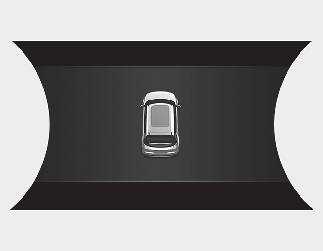
This warning is displayed if you turn off the vehicle when the sunroof is open.
Close the sunroof securely before leaving your vehicle.
Low Pressure warning display
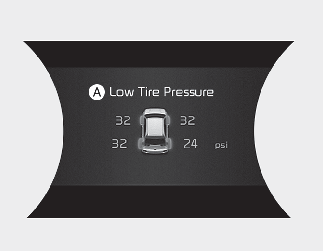
A: Low Tire Pressure
This warning message is displayed if the tire pressure is low. The corresponding tire on the vehicle will appearappear.
* For more details, refer to More Details.
Lights mode
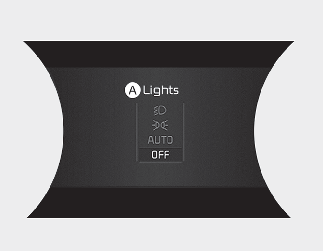
A: Lights
This indicator displays which exterior light is selected using the lighting control.
You can activate or deactivate Wiper/Lights Display function from the infotainment system screen.
Wiper mode
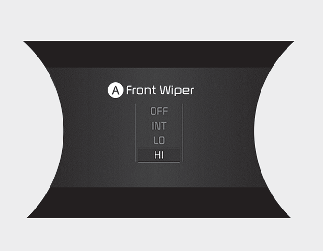
A: Front Wiper
This indicator displays which wiper speed is selected using the wiper control.
You can activate or deactivate Wiper/Lights Display function from the User Settings mode in the cluster LCD display.
Low washer fluid
This warning message is displayed if the washer fluid level in the reservoir is nearly empty.
Have the washer fluid reservoir refilled.
Check headlight
This warning message is displayed if the headlights are not operating properly. A headlight bulb may need to be replaced.
Make sure to replace the burned out bulb with a new one of the same wattage rating.
Check turn signal
This warning message is displayed if the turn signal lamps are not operating properly. A lamp may need to be replaced.
Make sure to replace the burned out bulb with a new one of the same wattage rating.
Check brake light
This warning message is displayed if the stop lamps are not operating properly. A lamp may need to be replaced.
Make sure to replace the burned out bulb with a new one of the same wattage rating.
Check headlight LED
This warning message is displayed if there is a problem with the LED headlight. Have your vehicle inspected by an authorized Kia dealer.
Check Forward Collision-Avoidance Assist (FCA)
This warning message is displayed if there is a problem with Forward Collision-Avoidance Assist. Have your vehicle inspected by an authorized Kia dealer.
* For more details, refer to More Details.
Check Smart Cruise Control (SCC)
This warning message is displayed if there is a problem with Smart Cruise Control. Have your vehicle inspected by an authorized Kia dealer.
* For more details, refer to More Details.
Check Lane Keeping Assist (LKA)
This warning message is displayed if there is a problem with Lane Keeping Assist. Have your vehicle inspected by an authorized Kia dealer.
* For more details, refer to More Details.
Check Driver Attention Warning (DAW)
This warning message is displayed if there is a problem with Driver Attention Warning. Have your vehicle inspected by an authorized Kia dealer.
* For more details, refer to More Details.
Shift to P to charge
This message is displayed if you connect the charging cable without the gear in the P (Park) position.
Shift to P (Park) before connecting the charging cable.
Remaining Time
This message is displayed to notify the remaining time to charge the battery to the selected target battery charge level.
Unplug vehicle to start
This message is displayed when you start the vehicle without unplugging the charging cable. Unplug the charging cable, and then turn on the vehicle.
Charging Door Open
This message is displayed when the vehicle is driven with the charging door opened. Close the charging door and then start driving.
Charging Stopped. Check the cable connection
This warning message is displayed when charging is stopped because the charging connector is not correctly connected to the charging inlet.
If this occurs, separate the charging connector and re-connect it and check whether there is any problem (external damage, foreign substances, etc.) with the charging connector and charging inlet.
If the same problem occurs when charging the vehicle with a replaced charging cable or genuine Kia portable charger, we recommend that you have your vehicle inspected by an authorized Kia dealer.
Low Battery
When the high voltage battery level reaches below 8% for Cruise type and below 12% for City type, this warning message is displayed.
The warning light on the instrument cluster ( ) will turn ON simultaneously.
Charge the high voltage battery immediately.
Charge immediately. Power limited
When the high voltage battery level reaches below 3% for Cruise type and below 5% for City type, this warning message is displayed.
The warning light on the instrument cluster () and the power down indicator light ( ) will turn on simultaneously.
The vehicle's power will be reduced to minimize the energy consumption of the high voltage battery. Charge the battery immediately.
Low outside temperature may limit power output. Charge EV battery / Low EV battery temperature. Power limited
Both warning messages are displayed to protect electric vehicle system when outside temperature is low. If the high voltage battery charging level is low and parked outside in low temperature for a long time, vehicle power could be limited.
Charging the battery before driving helps increase power.

If this warning message is still displayed even after the ambient temperature has increased, have your vehicle inspected by an authorized Kia dealer.
EV Battery Overheated! Stop vehicle
This warning message is displayed to protect battery and electric vehicle system when the high voltage battery temperature is too high.
Turn off the START/STOP button and stop the vehicle so that the battery temperature decreases.
Power limited
This warning message is displayed when the vehicle's power is limited due to any of the following reasons:
-
When the high voltage battery is below a certain level, or voltage is decreasing.
-
When the temperature of the motor or high voltage battery is too high or too low.
-
When there is a problem with the cooling system or a failure that may interrupt normal driving.
When this warning message is displayed, do not accelerate or start the vehicle suddenly.
Charge the battery immediately when the high voltage battery level is not enough.
Stop vehicle and check power supply
This warning message is displayed when a failure occurs in the power supply system.
If this occurs, park the vehicle in a safe location and tow your vehicle to the nearest authorized Kia dealer and have your vehicle inspected by an authorized Kia dealer.
Check Virtual Engine Sound System
This message is displayed when there is a problem with the Virtual Engine Sound System (VESS).
If this occurs, have your vehicle inspected by an authorized Kia dealer.
Check electric vehicle system
This warning message is displayed when there is a problem with the electric vehicle control system.
Refrain from driving when the warning message is displayed.
If this occurs, have your vehicle inspected by an authorized Kia dealer.