
Operating door locks from inside the vehicle
With the door lock button
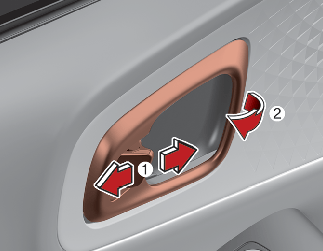
-
To unlock a door, pull the door lock button (1) to the "Unlock" position. The red mark on the door lock button will be visible.
-
To lock a door, push the door lock button (1) to the "Lock" position. If the door is locked properly, the red mark on the door lock button will not be visible.
-
To open a door, pull the door handle (2) outward.
-
If the inner door handle of the driver's (or front passenger's) door is pulled when the door lock button is in the lock position, the button will unlock and the door will open.
-
Doors cannot be locked if the smart key is in the vehicle and a door is open.
If a power door lock ever fails to function while you are in the vehicle, try one or more of the following techniques to exit:
-
Operate the door unlock feature repeatedly (both electronic and manual) while simultaneously pulling on the door handle.
-
Operate the other door locks and handles, front and rear.
-
Lower a front window and use the key to unlock the door from outside.

Do not pull the inner door handle of driver's (or passenger's) door while the vehicle is moving.
With central door lock/unlock switch
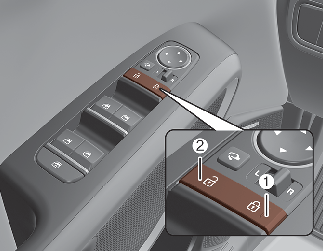
Operate by pressing the central door lock/unlock switch.
-
When pressing the right portion (1) for driver side or the upper portion (1) for passenger side of the switch, all vehicle doors will lock.
-
When pressing the left portion (2) for driver side or the lower portion (2) for passenger side of the switch, all vehicle doors will unlock.
-
If the smart key is in the vehicle and any door is opened, the doors will not lock even though the right portion (1) for driver side or upper portion (1) for passenger side of the central door lock switch is pressed.
Doors
-
The doors should always be fully closed and locked while the vehicle is in motion to prevent accidental opening of the door.
-
Be careful when opening doors and watch for vehicles, motorcycles, bicycles or pedestrians approaching the vehicle in the path of the door. Opening a door when something is approaching can cause damage or injury.
Unattended children, the elderly or pets
An enclosed vehicle can become extremely hot, causing death or severe injury such as heatstroke to unattended children, the elderly or pets who cannot escape the vehicle. When left or trapped in a hot vehicle, make sure to stay hydrated and avoid sun exposure through the vehicle’s windshield. Furthermore, children might operate features of the vehicle that could injure them, or they could encounter other harm, possibly from someone gaining entry to the vehicle. Never leave children or animals unattended in your vehicle.
Door lock/unlock features
The vehicle is equipped with door lock/unlock features for the safety and convenience of passengers.
All doors will automatically unlock when an impact causes the air bags to deploy.
All doors will automatically lock after the vehicle speed exceeds 15 km/h (10 mph).

-
You can activate or deactivate the Easy Access Function from Vehicle Settings from the infotainment system screen.
-
The infotainment system may change after software updates. For more information, refer to the manual provided in the infotainment system and the quick reference guide.
Child-protector rear door locks
The child safety lock is provided to help prevent children from accidentally opening the rear doors from inside the vehicle. The rear door safety locks should be used whenever children are in the vehicle.
The child safety lock is located on the edge of each rear door. When the child safety lock is in the lock position (1), the rear door will not open if the inner door handle (2) is pulled.
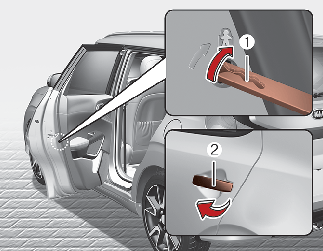
To lock the child safety lock, insert a key (or screwdriver) into the hole and turn it to the lock position.
To allow a rear door to be opened from inside the vehicle, unlock the child safety lock.
Rear door locks
Use the rear door safety locks whenever children are in the vehicle. If a child accidentally opens the rear doors while the vehicle is moving, he or she may fall out.