
Blind-Spot Collision-Avoidance Assist settings
Blind-spot safety
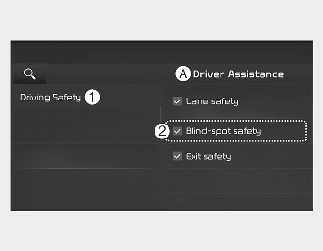
A: Driver Assistance
-
Driving Safety
-
Blind-Spot Safety
With the vehicle on, Settings → Vehicle → Driver Assistance → Driving Safety on the infotainment system.
-
Blind-Spot Safety: Blind-Spot Collision-Avoidance Assist will warn you with a warning message and an audible warning depending on the collision risk level while driving, and will provide emergency braking depending on the collision risk level for parallel parking exit.
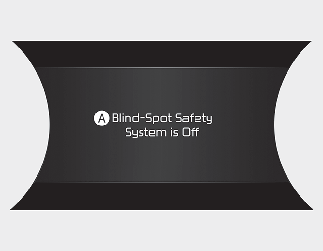
A: Blind-Spot Safety System is Off
When activating Blind-Spot Collision-Avoidance Assist or restarting the vehicle with this function activated, the warning light on the side mirrors will appear for approximately 3 seconds.
When the vehicle is restarted with Blind-Spot Collision-Avoidance Assist inactivated, the warning message will appear on the cluster.

If Blind-Spot Safety is deselected, the driver should always be aware of the surroundings and drive safely.

If the vehicle is restarted, Blind-Spot Collision-Avoidance Assist will maintain the last setting.
Warning volume
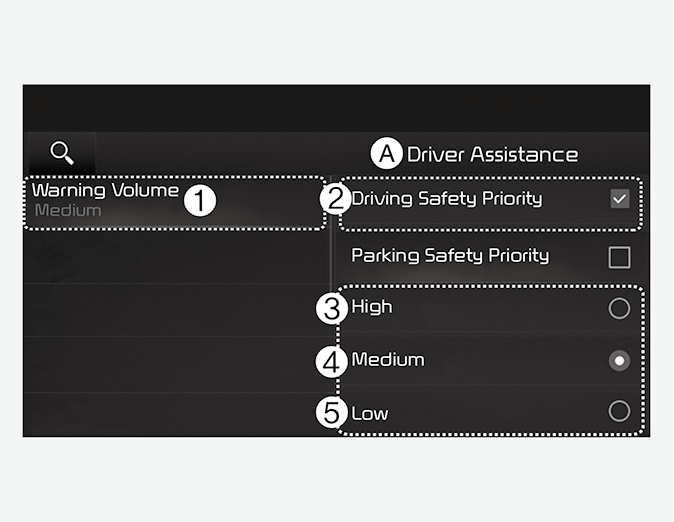
A: Driver Assistance
-
Warning Volume
-
Driving Safety Priority
-
High
-
Medium
-
Low
With the vehicle on, touch Settings → Vehicle → Driver Assistance → Warning Volume on the infotainment system to change the Warning volume to adjust the Warning volume levels; High, Medium or Low.
If Driving Safety Priority is selected, the audio volume will temporarily decrease to warn the driver with the audible warning for safe driving.
If you change the Warning volume, the Warning volume of other Driver Assistance systems may change.

The setting of the Warning volume applies to all functions of Blind-Spot Collision-Avoidance Assist.