
Operating door locks from outside the vehicle
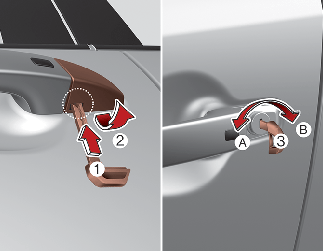
If using the mechanical key, turn the key toward the rear of the vehicle to lock (1) and toward the front of the vehicle to unlock (2).
-
Pull out the door handle.
-
Press the lever (1) located inside the bottom part of the cover with a key or flat-head screwdriver.
-
Push out the cover (2) while pressing the lever.
-
If you lock the driver's door with a key, only the driver's door will lock/unlock.
-
From the driver's door, turn the key toward the front of the vehicle once to unlock the driver's door and once more within 4 seconds to unlock all doors.
-
Doors can also be locked and unlocked with the smart key.
-
Once the doors are unlocked, they may be opened by pulling the door handle.
-
When closing the door, push the door by hand. Make sure the doors are closed securely.

-
In cold and wet climates, door lock and door mechanisms may not work properly due to freezing conditions.
-
If the door is locked/unlocked multiple times in rapid succession with either the vehicle key or door lock switch, the system may stop operating temporarily in order to protect the circuit and prevent damage to system components.

-
Securely close your door before you begin driving. Failure to fully close your door may cause it to open during vehicle operation.
-
Keep your body out of the way of the closing door to prevent injuries.

Do not unnecessarily open and close the door repeatedly or with excessive force. Such action can damage the vehicle door.
To lock a door without the key, push the inside door lock button (1) or central door lock switch (2) to the "Lock" position and close the door (3).
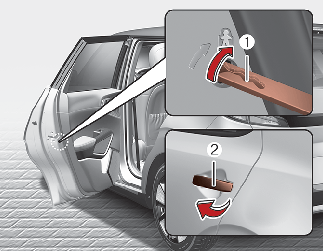
If you lock the door with the central door lock switch (2), all vehicle doors will lock automatically.
Always turn the START/STOP button to OFF position, engage the parking brake, close all windows, and lock all doors when leaving your vehicle unattended.