
Front seat adjustment - power (if equipped)
The front seat can be adjusted by using the control switches located on the outside of the seat cushion. Before driving, adjust the seat to the proper position so you can easily control the steering wheel, pedals and switches on the instrument panel.

The power seat is operable with the ENGINE START/STOP button in OFF.
Therefore, children should never be left unattended in the vehicle.
-
The power seat is driven by an electric motor. Stop operating once the adjustment is completed. Excessive operation may damage the electrical equipment.
-
When in operation, the power seat consumes a large amount of electrical power. To prevent unnecessary charging system drain, don’t adjust the power seat longer than necessary whilst the engine is not running.
-
Do not operate two or more power seat control switches at the same time. Doing so may result in power seat motor or electrical component malfunction.
Forward and backward
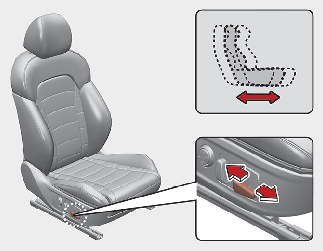
Push the control switch forward or backward to move the seat to the desired position. Release the switch once the seat reaches the desired position.
Cushion extension (for driver's seat, if equipped)
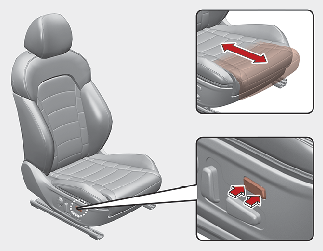
To move the front part of cushion forward:
-
Push the front part of control switch to move the seat cushion to the desired length.
-
Release the switch once the seat cushion reaches the desired length.
To move the front part of cushion rearward:
-
Push the rear part of control switch to move the seat cushion to the desired length.
-
Release the switch once the seat cushion reaches the desired length.
Seatback angle
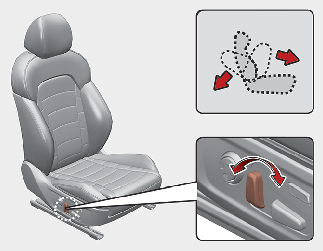
Push the control switch forward or backward to move the seatback to the desired angle. Release the switch once the seat reaches the desired position.
Seat height
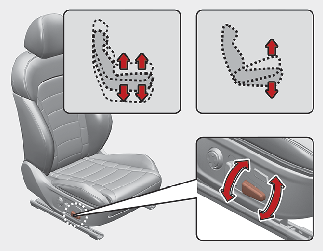
Pull the front portion of the control switch up to raise or press down to lower the front part of the seat cushion. Pull the rear portion of the control switch up to raise or press down to lower the seat cushion. Release the switch once the seat reaches the desired position.
Lumbar support (if equipped)
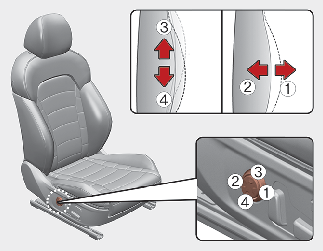
The lumbar support can be adjusted by pressing the lumbar support switch on the side of the seat.
-
Press the front portion (1) of the switch to increase support, or the rear portion (2) of the switch, to decrease support.
-
Release the switch once it reaches the desired position.
-
Press the upper portion (3) of the switch to move the support position up, or press the lower portion (4) of the switch, to move the support position down.
-
Release the switch once it reaches the desired position.
Seat back bolster control (if equipped, for power seat)
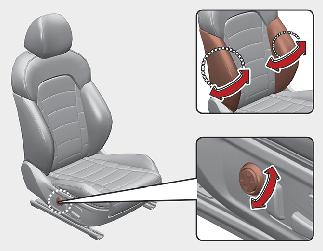
-
Turn the adjustment switch clockwise, the right/left seatback bolsters will be adjusted inward. Turn the switch counterclockwise, the seatback bolster will be adjusted outward.
-
To adjust the bolster height to its maximum in the default state, operate the switch for 8 seconds. After that, release the switch because there is no change in height even if you continue to operate the switch.
-
Once adjustment is done, leave the switch in place.