
Intelligent Speed Limit Assist setting
Setting
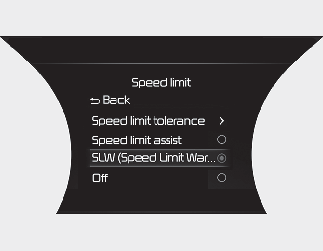
Speed limit
-
The driver can activate Intelligent Speed Limit Assist by selecting “User Settings (LCD display) or Settings → Vehicle (Infotainment System screen) → Driver Assistance → Speed Limit”.
-
When ‘Speed Limit Assist’ is activated, Intelligent Speed Limit Assist shows the driver the speed limit and traffic sign information, and the driver can set the speed of Manual Speed Limit Assist or Smart Cruise Control to drive the vehicle at the speed limit.
-
When 'Speed Limit Warning' is activated, the symbols appear on the instrument cluster to display the speed limit information and overtaking restriction, and warns the driver if the vehicle is moving faster than a speed limit.
-
When 'Off' is selected, Intelligent Speed Limit Assist is deactivated.

When 'Speed Limit Warning' is activated, the vehicle does not adjust the speed automatically.
Speed Offset Setting
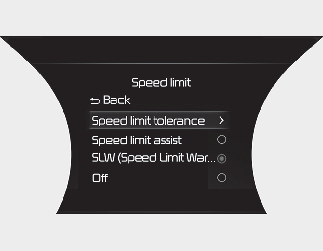
-
The driver can adjust Speed Offset by selecting “User Settings (LCD display) or Settings → Vehicle (Infotainment System screen) → Driver Assistance → Speed Limit → Speed Limit tolerance”. When Speed Offset Setting is adjusted, the vehicle updates the offset value and activates the speed limit warning and assist according to the current road speed limit.
In the following text, ‘Speed Limit tolerance’ is referred to as 'Offset'

-
For your safety, change the settings after parking the vehicle at a safe location.
-
Intelligent Speed Limit Assist is activated based on the offset value added to the speed limit. Adjust the offset value to '0' if the vehicle speed is equal to the speed limit.
-
Speed limit warning function is activated when the driving speed exceeds the speed limit with the offset value added. Set the offset value to "0" to activate the warning message immediately when the vehicle has exceeded the speed limit.