
Blind-Spot Collision-Avoidance Assist settings
Settings features
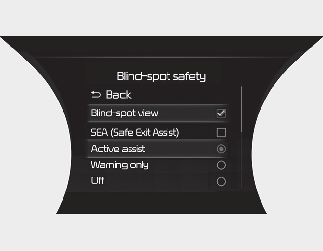
Blind-Spot Safety
With the ENGINE START/STOP button in the ON position, select or deselect ‘Driver Assistance → Blind-Spot Safety’ from the “User Settings (LCD display) or Settings → Vehicle (Infotainment System screen)” to set whether or not to use each function.
-
If ‘Active assist’ is selected, Blind-Spot Collision-Avoidance Assist will warn the driver with a warning message, an audible warning and braking assist will be applied depending on the collision risk levels.
-
If ‘Warning only’ is selected, Blind-Spot Collision-Avoidance Assist will warn the driver with a warning message, an audible warning depending on the collision risk levels. Braking will not be assisted.
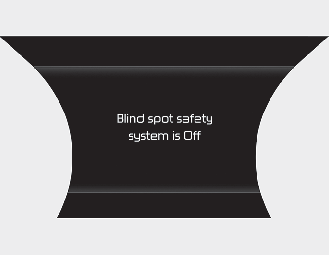
When the engine is restarted with Blind-Spot Collision-Avoidance Assist off, the ‘Blind-Spot Safety System is Off’ message will appear on the cluster.
If you change the setting from ‘Off’ to ‘Active Assist’ or ‘Warning Only’, the warning light on the outside rearview mirror will blink for three seconds.
In addition, if the engine is turned on, when Blind-Spot Collision-Avoidance Assist is set to ‘Active Assist’ or ‘Warning Only’, the warning light on the outside rearview mirror will blink for three seconds.

-
If ‘Warning Only’ is selected, braking is not assisted.
-
If ‘Off’ is selected, the driver should always be aware of the surroundings and drive safely.

If the engine is restarted, Blind-Spot Collision-Avoidance Assist will maintain the last setting.
Warning Timing
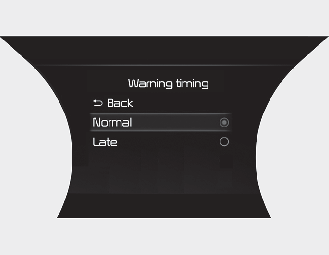
With the ENGINE START/STOP button in the ON position, select ‘Driver Assistance → Warning Timing’ from the “User Settings (LCD display) or Settings → Vehicle (Infotainment System screen)” to change the initial warning activation time for Blind-Spot Collision-Avoidance Assist.
When the vehicle is first delivered, Warning Timing is set to ‘Normal. If you change the Warning Timing, the warning time of other Driver Assistance functions may change.
Warning Volume
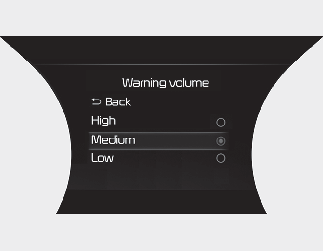
With the ENGINE START/STOP button in the ON position, select ‘Driver Assistance → Warning Volume’ from the “User Settings (LCD display) or Settings → Vehicle (Infotainment System screen)” to change the Warning Volume to ‘High’, ‘Medium’, ‘Low’ for Blind-Spot Collision-Avoidance Assist.
If you change the Warning Volume, the warning volume of other Driver Assistance functions may change.

-
The setting of the Warning Timing and Warning Volume applies to all functions of the Blind-Spot Collision-Avoidance Assist.
-
Even though ‘Normal’ is selected for Warning Timing, if the vehicles approaches at high speed, the initial warning activation time may seem late.
-
Select ‘Late’ for Warning Timing when traffic is light and when driving speed is slow.
If your vehicle is equipped with additional Infotainment System, please scan the QR code in a separately supplied Car Infotainment System Quick Reference Guide.
Blind-Spot Collision-Avoidance Assist operation
Warning and control
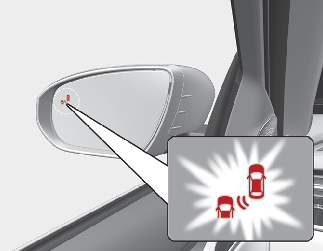
-
To warn the driver a vehicle is detected, the warning light on the outside rearview mirror and head-up display (if equipped) will appear.
-
Blind-Spot Collision-Avoidance Assist will operate when your vehicle speed is above 20 km/h (12 mph) and the speed of the vehicle in the blind spot area is above 10 km/h (7 mph).
Collision warning
-
Collision warning will operate when the turn signal is turned on in the direction of the detected vehicle.
-
If ‘Warning Only’ is selected from the “User Settings (LCD display) or Settings → Vehicle (Infotainment System screen), the collision warning will operate when your vehicle approaches the lane the blind spot vehicle is detected.
-
To warn the driver of a collision, the warning light on the outside rearview mirror and head-up display (if equipped) will blink.
-
When the turn signal is turned off or you move away from the lane, the collision warning will be cancelled and the function will return to vehicle detection state.
-
The detecting range of the rear corner radar is determined by a standard road width, therefore, on a narrow road, the function may detect other vehicles in the next lane and warn you. In contrast, on a wide road, the function may not be able to detect a vehicle driving in the next lane and may not warn you.
-
When the hazard warning light is on, the collision warning by the turn signal will not operate.
Collision-avoidance assist (whilst driving)
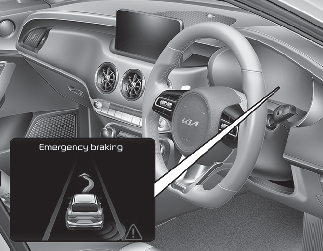
-
To warn the driver of a collision, the warning light on the outside rearview mirror will blink and a warning message will appear on the cluster.
-
The function will operate when your vehicle speed is between 60~200 km/h (40~120 mph) and both lane markings of the driving lane are detected.
-
Emergency braking will be assisted to help prevent collision with the vehicle in the blind spot area.
-
Collision-avoidance assist will be cancelled under the following circumstances:
-
Your vehicle enters the next lane by a certain distance
-
Your vehicle is away from the collision risk
-
The steering wheel is sharply steered
-
The brake pedal is depressed
-
Forward Collision-Avoidance Assist is operating
-
-
After Blind-Spot Collision-Avoidance Assist operation or changing lane, you must drive to the centre of the lane. Blind-Spot Collision-Avoidance Assist will not operate if the vehicle is not driven in the centre of the lane.
Collision-avoidance assist (whilst departing)
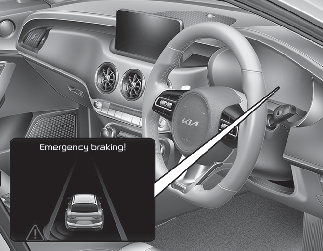
-
To warn the driver of a collision, the warning light on the outside rearview mirror will blink and a warning message will appear on the cluster.
-
Blind-Spot Collision-Avoidance Assist will operate when your vehicle speed is below 3 km/h (2 mph) and the speed of the vehicle in the blind spot area is above 5 km/h (3 mph).
-
Emergency braking will be assisted to help prevent collision with the vehicle in the blind spot area.
Stopping vehicle and ending brake control
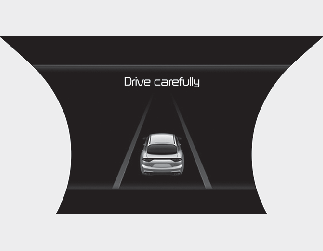
-
When the vehicle is stopped due to emergency braking, the ‘Drive carefully’ warning message will appear on the cluster.
-
For your safety, the driver should depress the brake pedal immediately and check the surroundings.
-
Brake control will end after the vehicle is stopped by emergency braking for approximately 2 seconds.
-
For your safety, change the Settings after parking the vehicle at a safe location.
-
If any other function’s warning message is displayed or audible warning is generated, Blind-Spot Collision-Avoidance Assist's warning message may not be displayed and audible warning may not be displayed and audible warning may not be generated.
-
You may not hear the warning sound of Blind-Spot Collision-Avoidance Assist if the surrounding is noisy.
-
Blind-Spot Collision-Avoidance Assist may not operate if the driver applies the brake pedal to avoid collision.
-
When Blind-Spot Collision-Avoidance Assist is operating, braking control by the function will automatically cancel when the driver excessively depresses the accelerator pedal or sharply steers the vehicle.
-
If changing the gear quickly during reversing the vehicle, Blind-Spot Collision-Avoidance Assist may not work or may operate unnecessarily.
-
During Blind-Spot Collision-Avoidance Assist operation, the vehicle may stop suddenly injuring passengers and shifting loose objects. Always have the seat belt on and keep loose objects secured.
-
Even if there is a problem with Blind-Spot Collision-Avoidance Assist, the vehicle’s basic braking performance will operate normally.
-
Blind-Spot Collision-Avoidance Assist does not operate in all situations or cannot avoid all collisions.
-
Blind-Spot Collision-Avoidance Assist may warn the driver late or may not warn the driver depending on the road and driving conditions.
-
Driver should maintain control of the vehicle at all times. Do not depend on Blind-Spot Collision-Avoidance Assist. Maintain a safe braking distance, and if necessary, depress the brake pedal to reduce driving speed or to stop the vehicle.
-
Never operate Blind-Spot Collision-Avoidance Assist on people, animal, objects, etc. It may cause serious injury or death.
The brake control may not operate properly depending on the status of ESC (Electronic Stability Control).
There will only be a warning when:
-
The ESC (Electronic Stability Control) warning light is on.
-
ESC (Electronic Stability Control) is engaged in a different function.
Blind-Spot Collision-Avoidance Assist malfunction and limitations
Blind-Spot Collision-Avoidance Assist malfunction
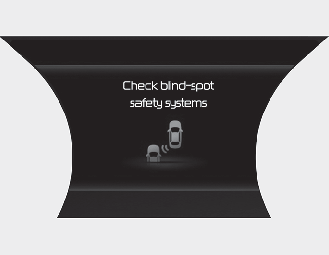
When Blind-Spot Collision-Avoidance Assist is not working properly, the ‘Check Blind-Spot Safety system’ warning message will appear on the cluster, and the function will turn off automatically, or the function will be limited. In this case, have your vehicle inspected by a professional workshop. Kia recommends to contact an authorised Kia dealer/service partner.
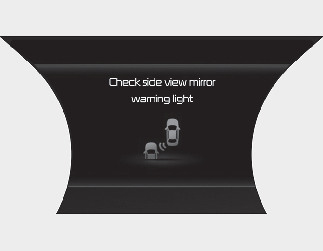
When the outside rearview mirror warning light is not working properly, the ‘Check side view mirror warning light’ warning message will appear on the cluster. We recommend that you have your vehicle inspected by an authorised Kia dealer/service partner.
Blind-Spot Collision-Avoidance Assist disabled
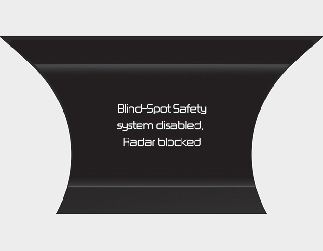
When the rear bumper around the rear corner radar or sensor is covered with foreign material, such as snow or rain, or installing a trailer or carrier, it can reduce the detecting performance and temporarily limit or disable Blind-Spot Collision-Avoidance Assist.
If this occurs, the ‘Blind-Spot Safety system disabled. Radar blocked’ warning message will appear on the cluster.
Blind-Spot Collision-Avoidance Assist will operate normally when such foreign material or trailer, etc. is removed, and then the engine is restarted.
If Blind-Spot Collision-Avoidance Assist does not operate normally after it is removed, have the vehicle inspected by a professional workshop. Kia recommends to visit an authorised Kia dealer/service partner.
-
Even though the warning message does not appear on the cluster, Blind-Spot Collision-Avoidance Assist may not properly operate.
-
Blind-Spot Collision-Avoidance Assist may not properly operate in an area (for example, open terrain), where any objects are not detected right after the engine is turned on, or when the detecting sensor is blocked with foreign material right after the engine is turned on.
Turn off Blind-Spot Collision-Avoidance Assist to install a trailer, carrier, etc., or remove the trailer, carrier, etc. to use Blind-Spot Collision-Avoidance Assist.
Limitations of Blind-Spot Collision-Avoidance Assist
Blind-Spot Collision-Avoidance Assist may not operate normally, or the function may operate unexpectedly under the following circumstances:
-
There is inclement weather, such as heavy snow, heavy rain, etc.
-
The rear corner radar is covered with snow, rain, dirt, etc.
-
The temperature around the rear corner radar is high or low
-
Driving on a highway (or motorway) ramp
-
The road pavement (or the peripheral ground) abnormally contains metallic components (i.e. possibly due to subway construction).
-
There is a fixed object near the vehicle, such as sound barriers, guardrails, central dividers, entry barriers, street lamps, signs, tunnels, walls, etc. (including double structures)
-
Driving in large areas where there are few vehicles or structures (i.e. desert, meadow, suburb, etc.)
-
Driving through a narrow road where trees or grass are overgrown
-
Driving on a wet road surface, such as a puddle on the road
-
The other vehicle drives very close behind your vehicle, or the other vehicle passes by your vehicle in close proximity
-
The speed of the other vehicle is very fast that it passes by your vehicle in a short time
-
Your vehicle passes by the other vehicle
-
Your vehicle change lane
-
Your vehicle has started at the same time as the vehicle next to you and has accelerated
-
The vehicle in the next lane moves two lanes away from you, or when the vehicle two lanes away moves to the next lane from you
-
A trailer, carrier or other attachment is installed around the rear corner radar
-
The bumper around the rear corner radar is covered with objects, such as a bumper sticker, bumper guard, bike rack, etc.
-
The bumper around the rear corner radar is impacted, damaged or the radar is out of position
-
Your vehicle height is low or high due to heavy loads, abnormal tyre pressure, etc.
Blind-Spot Collision-Avoidance Assist may not operate normally, or the function may operate unexpectedly when the following objects are detected:
-
A motorcycle or bicycle is detected
-
A vehicle such as a flat trailer is detected
-
A big vehicle such as a bus or truck is detected
-
A moving obstacle such as a pedestrian, animal, shopping cart or a baby stroller is detected
-
A vehicle with low height such as a sports car is detected
Braking control may not work, driver’s attention is required in the following circumstances:
-
The vehicle severely vibrates when driving on a bumpy, uneven or concrete road
-
Driving on a slippery surface due to snow, water puddle, ice, etc.
-
The tyre pressure is low or a tyre is damaged
-
The brake is tuned
-
The vehicle makes abrupt lane changes
For more details on the limitations of the front view camera, refer to More Details.
Driving on curved road
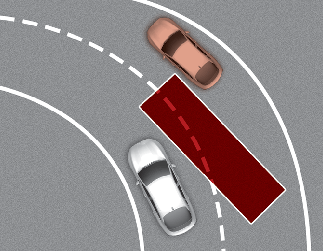
Blind-Spot Collision-Avoidance Assist may not operate properly when driving on a curved road. The function may not detect the vehicle in the next lane.
Always pay attention to road and driving conditions whilst driving.
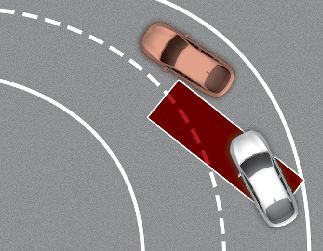
Blind-Spot Collision-Avoidance Assist may not operate properly when driving on the curved road. The function may recognize the vehicle in the same lane.
Always pay attention to road and driving conditions whilst driving.
Driving where the road is merging/ dividing
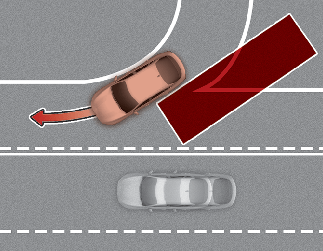
Blind-Spot Collision-Avoidance Assist may not operate properly when driving where the road merges or divides. The function may not detect the vehicle in the next lane.Always pay attention to road and driving conditions whilst driving.
Driving on an inclined road
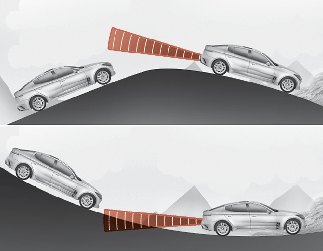
Blind-Spot Collision-Avoidance Assist may not operate properly when driving on a slope. The function may not detect the vehicle in the next lane or may incorrectly detect the ground or structure.
Always pay attention to road and driving conditions whilst driving.
Driving where the heights of the lanes are different
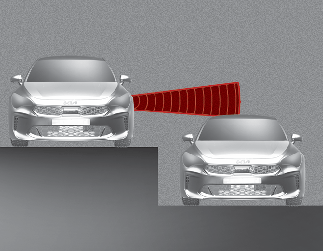
Blind-Spot Collision-Avoidance Assist may not operate properly when driving where the heights of the lanes are different. The function may not detect the vehicle on a road with different lane heights (underpass joining section, grade separated intersections, etc.).
Always pay attention to road and driving conditions whilst driving.
-
When you are towing a trailer or another vehicle, make sure that you turn off Blind-Spot Collision-Avoidance Assist.
-
Blind-Spot Collision-Avoidance Assist may not operate normally if interfered by strong electromagnetic waves.
-
Blind-Spot Collision-Avoidance Assist may not operate for 15 seconds after the vehicle is started, or the rear corner radars are initialized.