
Wireless smart phone charging system (if equipped)
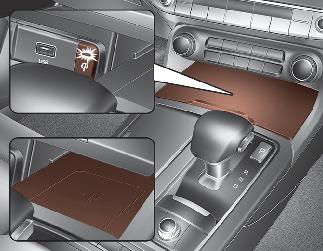
A wireless smart phone charging system located in front of the centre console.
Firmly close all doors, and turn the Vehicle is ON position. To start wireless charging, place the smart phone equipped with wireless charging function on the wireless charging pad.
For best wireless charging results, place the smart phone on the centre of the charging pad.
The wireless charging system is designed for one smart phone equipped with QI per single usage only. Please refer to the smart phone accessory cover or the smart phone manufacturer homepage to check whether your smart phone supports QI function.

If any metallic object such as coins is located between the wireless charging system and the smart phone, the charging may be disrupted. Also, the metallic object may heat up.
Wireless smart phone charging
-
Remove any object on the smart phone charging pad including the smart key. If there is any foreign object on the pad other than a smart phone, the wireless charging function may not operate properly.
-
Place the smart phone on the centre of the wireless charging pad.
-
The indicator light will change to orange once the wireless charging begins. After the charging is complete, the orange light will change to green.
-
Wireless Charging System is activated or deactivated when you select “User settings (LCD display) or Settings → Vehicle (Infotainment System screen) → Convenience → Wireless charging system’ from the Settings menu in the cluster LCD display or the Settings in the Infotainment System screen.
For more details, refer to More Details.
 NOTICE
The infotainment system may change after software updates. For more information, refer to the manual provided in the infotainment system and the quick reference guide.
If the wireless charging is not functioning properly, the orange light will blink and flash for ten seconds then turn off. In such cases, remove the smart phone from the pad and replace it on the pad again, or double check the charging status.
If you leave the smart phone on the charging pad when the vehicle ignition is in OFF, the vehicle will alert you through warning messages and sound (applicable for vehicles with voice guidance function).

-
Securely close the tray cover when using the wireless smart phone charge function.
-
Close the tray cover when the smart phone is placed in it at all times. If the vehicle is in motion without the tray cover closed, it is more likely that the driver may use the smart phone. The use of smart phones whilst driving may lead to possible injuries and accidents.
-
If it is not possible to close the tray cover due to the size of the smart phone, do not use the wireless smart phone charging function at all.
-
When the tray cover is broken, do not use the wireless charging function before the tray cover is repaired.
-
When the interior temperature of the wireless charging system rises above a set temperature, the wireless charging will cease to function. After the interior temperature drops below the threshold, the wireless charging function will resume.
-
The wireless charging may not function properly when there is a heavy accessory cover on the smart phone.
The wireless charging will stop when the smart phone is not in complete contact with the wireless charging pad.
-
The smart key detection feature in operation could temporarily stop charging.
(When turning on ignition, opening doors, or closing doors)
-
The wireless charging will stop when the vehicle is turned OFF.
-
Items equipped with magnetic components such as credit card, telephone card, bankbook, any transportation ticket and such may become damaged during wireless charging.
-
Place the smart phone on the centre of the charge pad for best results. The smart phone may not charge when placed near the rim of the charging pad. When the smart phone does get charged, it may heat up excessively.
-
For smart phones without built-in wireless charging system, an appropriate accessory has to be equipped.
-
Cellphones without the certification for wireless charging (
 ) could fail to charge.
-
The self-protection feature equipped in some mobile phones could slow down or stop charging.
-
The indicator light of some manufacturers’ smart phones may still be yellow after the smart phone is fully charged. This is due to the particular characteristic of the smart phone and not a malfunction of the wireless charging.
-
When any smart phone without a wireless charging function or a metallic object is placed on the charging pad, a small noise may sound. This small sound is due to the vehicle discerning compatibility of the object placed on the charging pad. It does not affect your vehicle or the smart phone in any way.