
Driver position memory system (if equipped, for power seat)
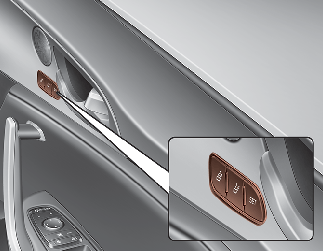
Driving Position Memory System is the facility that enables driver’s seat, steering wheel, outside rear view mirrors and head-up display (HUD) to be controlled with a simple button operation, which allows a driver to recall memorized driving positions to suit your preferences.
-
Driver’s seat/Steering Wheel /Exterior mirrors: position
-
Head up Display (HUD): position
 WARNING
Never attempt to operate the driver position memory system whilst the vehicle is moving.
This could result in loss of control, and an accident causing death, serious injury, or property damage.
Storing positions into memory using the buttons on the door
Storing driver’s seat positions
-
Press the Parking button whilst the ENGINE START/STOP button is ON.
-
Adjust the driver’s seat and outside rearview mirror and Head up display comfortable for the driver.
-
Press SET button on the control panel. The system will beep once.
-
Press one of the memory buttons (1 or 2) within 5 seconds after pressing the SET button. The system will beep twice when memory has been successfully stored.
Recalling positions from memory
-
Press the Parking button whilst the ENGINE START/STOP button is ON.
-
To recall the position in the memory, press the desired memory button (1 or 2). The system will beep once, then the driver’s seat will automatically adjust to the stored position.
Adjusting the control switch for the driver’s seat whilst the system is recalling the stored position will cause the movement to stop and move in the direction that the control switch is moved.
Use caution when recalling the adjustment memory whilst sitting in the vehicle. Push the seat position control switch to the desired position immediately if the seat moves too far in any direction.
Easy access function (if equipped)
To provide easier entry to or exit from the vehicle for a driver, the driver’s seat will be adjusted backwards as far as the distance set by User Setting on the Instrument Panel. This occurs when the driver’s door is opened and the ENGINE START/STOP button is Off with the shift lever in the P position. If, however, the distance between the front seat and back seats are too close, the driver’s seat could fail to adjust itself backwards.
The steering wheel moves to the top. With the steering wheel moving as far as top and as far as forward to a driver on a regular basis (once every 100 ignitions switched on), the steering wheel identifies and adjusts its location by itself.
The driver’s seat and steering wheel will move back to its original position when a driver closes a driver’s door with a smart key in his pocket and the ENGINE START/STOP button is in OFF or in ACC.
You can activate or deactivate this feature. Refer to More Details.
Driver position memory system reset
If the Driver position memory system reset fails to work, initialize the system as follows.
How to initialize:
-
Stop the car and open the driver’s door with the ENGINE START/STOP button in ON and the automatic shift lever in P(parking) position.
-
Pull the driver’s seat forward as far as possible and have the seatback upright as much as possible using driver’s seat forward/backward adjustment and seatback angle (recline) movement switches.
-
Push SET button and and seat fore movement switch button for 2 seconds simultaneously.
Initialization in the process :
-
Initialization begins as the alarm sounds.
-
The seat and seatback will automatically move backwards. The alarm sound will continue whilst the system is in operation.
-
Initialization will be all set after the seat and seatback move to the centre with alarm sound being raised. If, however, cases as follows occur, the initialization process will come to a stop and the alarm sound will stop as well.
-
When pushing driving position memory system button
-
When pushing driver’s seat height adjustment switch
-
When changing the shift lever from P position to other positions
-
When the driving speed exceeds 3km/h
-
When the driver’s door is closed
-