
Surround View Monitor operation
Surround View Monitor controller
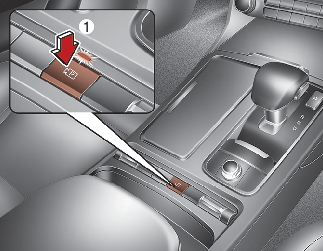
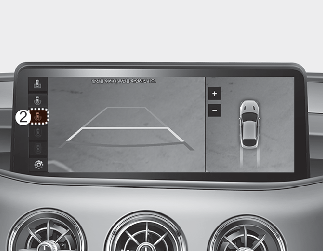
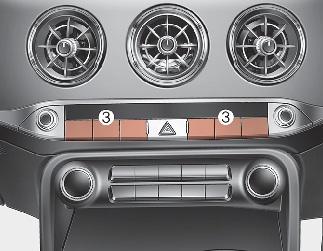
-
Press the Parking/View button (1) to turn on Surround View Monitor.
-
Press the button again to turn off Surround View Monitor.
-
Press the Change View button (2) to change the view mode.
-
Press the Infotainment system button (3) to turn off the function except rear view.
Front view
The function displays front view with the gear in N (Neutral) or D (Drive) to help you park safely. Front view contains top view/front view.
Operating conditions
-
The function will operate when the following conditions are satisfied:
-
The front view will operate when the gear is shifted from R (Reverse) to N (Neutral) or D (Drive).
-
If pressing the Parking/View (1) button shortly when the rear view is displayed on the screen and the gear is in N (Neutral)/D (Drive) position together with 15km/h or under the vehicle speed, the front view will be displayed on the screen.
-
The Parking/View button (1) is pressed when gearshift status is D (Drive), N (Neutral).
-
-
The Surround View Monitor Auto On will operate when the following conditions are satisfied:
-
If the Forward/Revers Parking Distance Warning warns with the gear in D (Drive), the parking assist front view will be displayed when 'Driver Assistance → Parking Safety → Surround View Monitor Auto On' is selected.
-
Off conditions
-
The Parking/View button (1) is pressed again.
-
When vehicle speed is above 15 km/h (9 mph) and the gear is in D (Drive), Surround View Monitor will be turned off and the screen will be changed to the infotainment system screen with the Surround View Monitor. The screen will not revert to the surround view screen even though the vehicle speed is below 15km/h (9 mph) again.
-
Press the infotainment system button (3) to change the screen to infotainment system screen.
Rear view
The function displays rear view with the gear in N (Neutral) or D (Drive) to help you park safely. Rear view contains top view/rear view/side view.
Operating conditions
-
The screen is turned on when the gear is shifted to R (Reverse).
-
The screen is turned on when the Parking/View button is pressed when the gear is in P (Parking). However, parking guidelines are not shown.
Off conditions
-
When the gear is in R (Reverse), the screen is not turned off.
-
The screen is turned off when the Parking/View button (1) is pressed with the gear in P (Parking).
-
When shifting the gear from R (Reverse) position to P (Parking) position, the screen will be turned off.
Rear View Whilst Driving (if equipped)
The Driving Rear View Monitor is a assist function that shows the image behind the vehicle on the screen regardless of vehicle speed whilst driving.
Operating conditions
-
The engine is running.
-
The vehicle's speed is over 15 km/h (10 mph) and the Parking/View button is pressed (1, indicator ON).
-
The vehicle's speed is under 15 km/h (10 mph) and the icon (2) on the screen is pressed.
Off conditions
-
The Parking/View button (1, indicator OFF) is pressed again.
-
Other Surround View Monitor modes are selected from the screen (when vehicle speed is under 15km/h).
-
One of the infotainment system button (3) is pressed.
In case of driving over 15km/h with Surround View Monitor operating:
-
The rear image stays ON when Driving Rear View was on the screen.
-
When one of the other Surround View Monitor view modes (front wide view, front top view, front side view) was on the screen, the screen turns OFF and switches to the previously displayed infotainment system screen.
-
Whilst driving under 15km/h with the state that Driving Rear View function is ON, the rear image of Driving Rear View stays ON.
-
You can select other Surround View Monitor view modes (front wide view, front top view, front side view) by pressing the view mode on the infotainment system screen.
-
When the vehicle is backing up, the rear image will be appear on the screen automatically regardless of the vehicle speed or the Parking/View button (1, indicator OFF) is pressed again.
-
Other Surround View Monitor modes are selected from the screen (when vehicle speed is under 15km/h)
-
One of the infotainment system button (3) is pressed.
-
The Parking/View button (1) status.
-
If the rear image of Driving Rear View was ON, the screen switches to the rear surround view.
-
When the gear position is shifted from R (Reverse) to D (Drive), the screen of the previous Surround View Monitor mode is displayed. A warning indicator on the screen appears when:
-
The tailgate is opened
-
The driver/passenger's door is opened
-
The outer side view mirror is folded
-