
Feature of Your Audio
Head unit
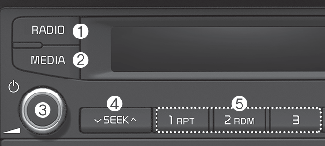
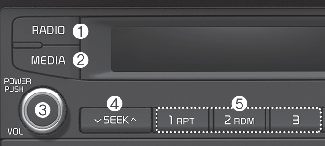
* The actual features in the vehicle may differ from the illustration.
-
RADIO
-
Plays Radio(FM/AM) mode.
-
Each time the button is pressed, the mode is changed sequentially.
-
MEDIA
-
Plays Media USB(iPod®), AUX mode.
-
Each time the button is pressed, the mode is changed sequentially.
-
POWER/VOL knob
-
Power knob: Turns power On/Off by pressing the knob.
-
Volume knob: Sets volume by turning the knob left/right.
-
SEEK
When pressed quickly
-
Radio mode: Searches broadcast frequencies.
-
Media mode: Changes the track, file or title. (except AUX)
When pressed and held
-
Frequency is controlled by 1 step quickly. When the button is released after pressing and holding, searches broadcast frequencies.
-
Media mode: Rewinds or fast-forwards the song. (except AUX)
-
[1] ~ [3] (Preset)
When pressed quickly
-
Radio mode: Receives saved frequencies (channels).
-
Media mode (except AUX)
-
[1 RPT] button: Repeat/Repeat Folder
-
[2 RDM] button: Random Folder/ Random
-
When pressed and held
-
Radio mode: Saves frequencies (channels).
-
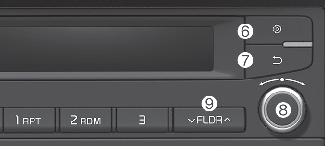
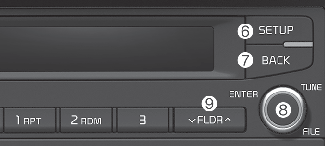
SETUP
-
Moves to Setup screen.
-
BACK
-
Moves to previous screen.
-
TUNE knob
-
Pressing TUNE knob: Displays menus for the current mode.
-
Radio mode: Changes frequency by turning the knob left/right.
-
Media mode: Searches songs (files) by turning the knob left/right.
-
FLDR
-
USB mode: Searches folders.
Steering Wheel Controls
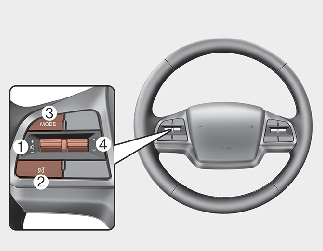
* The actual features in the vehicle may differ from the illustration.
-
VOLUME
-
Controls the audio volume
-
MUTE
-
Mutes the audio volume.
-
MODE
-
Each time this is pressed, the mode is changed sequentially.
-
If the media is not connected, the corresponding modes will be disabled.
-
Press and hold to turn the Infotainment System on/off*.
-
When power is off, press button to turn power back on*.
* if equipped
-
SEEK/TRACK
When pressed quickly
-
Radio mode: Searches broadcast frequencies saved to Presets.
-
Media mode: Changes track, file or title. (except AUX)
When pressed and held
-
Frequency is controlled by 1 step quickly. When the button is released after pressing and holding, searches broadcast frequencies.
-
Media mode: Rewinds or fast-forwards the song. (except AUX)

Infotainment System Safety Warnings
-
Do not stare at the screen while driving. Staring at the screen for prolonged periods of time could lead to traffic accidents.
-
Do not disassemble, assemble, or modify the Infotainment System. Such acts could result in accidents, fire, or electric shock.
-
Using the phone while driving may lead to a lack of attention of traffic conditions and increase the likelihood of accidents. Use the phone feature after parking the vehicle.
-
Exercise caution not to spill water or introduce foreign objects into the device. Such acts could lead to smoke, fire, or product malfunction.
-
Please refrain from use if the screen is blank or no sound can be heard as these signs may indicate product malfunction. Continued use in such conditions could lead to accidents (fires, electric shock) or product malfunctions.
-
Do not touch the antenna during thunder or lightening as such acts may lead to lightning induced electric shock.
-
Do not stop or park in parking-restricted areas to operate the product. Such acts could lead to traffic accidents.
-
Use the system with the vehicle ignition turned on. Prolonged use with the ignition turned off could result in battery discharge.
Distracted Driving
Driving while distracted can result in a loss of vehicle control that may lead to an accident, severe personal injury, and death. The driver’s primary responsibility is in the safe and legal operation of a vehicle, and use of any handheld devices, other equipment, or vehicle systems which take the driver’s eyes, attention and focus away from the safe operation of a vehicle or which are not permissible by law should never be used during operation of the vehicle.

-
Operating the device while driving could lead to accidents due to a lack of attention to external surroundings. First park the vehicle before operating the device.
-
Adjust the volume to levels that allow the driver to hear sounds from outside of the vehicle. Driving in a state where external sounds cannot be heard may lead to accidents.
-
Pay attention to the volume setting when turning the device on. A sudden output of extreme volume upon turning the device on could lead to hearing impairment. (Adjust the volume to a suitable levels before turning off the device.)
-
If you want to change the position of device installation, please inquire with your place of purchase or service maintenance center. Technical expertise is required to install or disassemble the device.
-
Turn on the car ignition before using this device. Do not operate the Infotainment System for long periods of time with the ignition turned off as such operations may lead to battery discharge.
-
Do not subject the device to severe shock or impact. Direct pressure onto the front side of the monitor may cause damage to the LCD or touch screen.
-
When cleaning the device, make sure to turn off the device and use a dry and smooth cloth. Never use tough materials, chemical cloths, or solvents (alcohol, benzene, thinners, etc.) as such materials may damage the device panel or cause color/quality deterioration.
-
Do not place beverages close to the Infotainment System. Spilling beverages may lead to system malfunction.
-
In case of product malfunction, Kia recommends to visit an authorized Kia dealer/service partner.
-
Placing the Infotainment System within an electromagnetic environment may result in noise interference.
-
Prevent caustic solutions such as perfume and cosmetic oil from contacting the dashboard because they may cause damage or discoloration.