
Feature of Your Audio
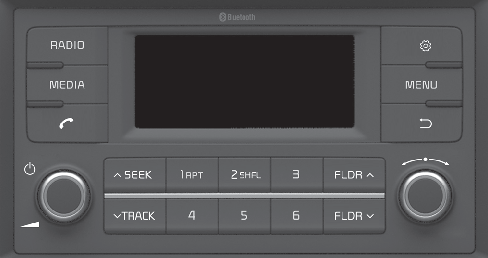
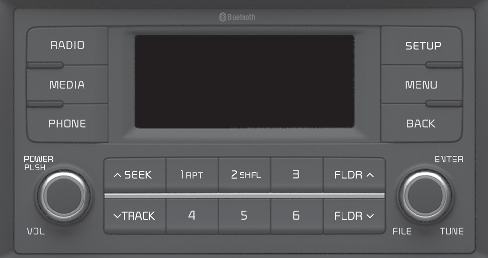
Head Unit
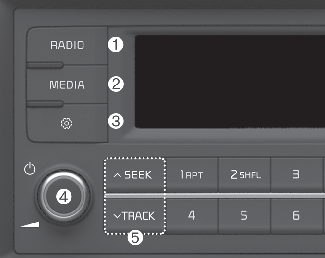
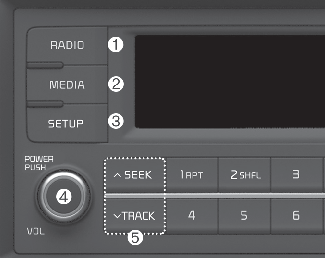
* The actual features in the vehicle may differ from the illustration.
-
RADIO
-
Plays Radio(FM/AM) mode.
-
Each time the button is pressed, the media mode popup will be displayed or closed.
-
The radio mode popup will not be displayed when [SETUP]button ▶ [Display] ▶ [Mode popup] is turned [Off].
-
MEDIA
-
Plays USB(iPod®), AUX mode.
-
Each time the button is pressed, the media mode popup will be displayed or closed.
-
The radio mode popup will not be displayed when [SETUP]button ▶ [Display] ▶ [Mode popup] is turned [Off].
-
SETUP
-
Moves to Setup screen.
-
POWER/VOL knob
-
Power knob: Turns power On/Off by pressing the knob.
-
Volume knob: Sets volume by turning the knob left/right.
-
SEEK/TRACK
When pressed quickly
-
Radio mode: Searches broadcast frequencies.
-
Media mode: Changes the track, file or title. (except AUX)
When pressed and held
-
Radio mode: Frequency is controlled by 1 step quickly. When the button is released after pressing and holding, searches broadcast frequencies.
-
Media mode: Rewinds or fast-forwards the song. (except AUX)
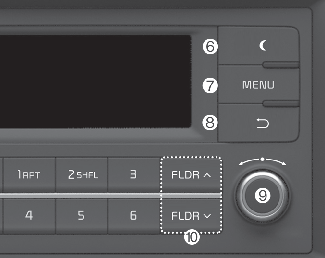
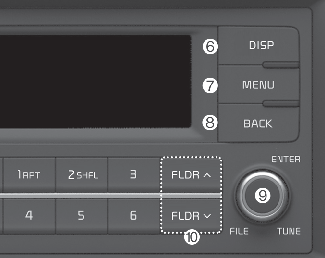
-
DISP
-
Turns off the screen.
-
Each time the button is pressed, it sets the Screen Off → On → Off.
-
MENU
-
Displays menus for the current mode.
-
BACK
-
Moves to previous screen.
-
TUNE knob
-
Radio mode: Changes frequency by turning the knob left/right.
-
Media mode: Searches songs(files) by turning the knob left/right.
-
FLDR
-
USB mode: Searches folders.
-
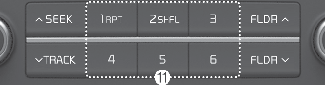
[1] ~ [6] (Preset)
When pressed quickly
-
Radio mode: Receives saved frequencies(channels).
-
Media mode(USB)
-
[1 RPT] button: Repeat/Repeat Folder
-
[2 SHFL] button:Shuffle Folder/Shuffle
-
-
Media mode(iPod®)
-
[1 RPT] button: Repeat
-
[2 SHFL] button: Shuffle
-
-
In case of Menu popup, the number menu is selected.
When pressed and held
-
Radio mode: Saves frequencies (channels).
(With Bluetooth® Wireless Technology)